Kovair is now part of SurgeONE.ai | Same experts, even more power.

Month: April 2014

Omnibus Integration for Major Global IT Services Company

Introduction

This company is one of the top ten global IT Companies and a global leader in delivering technology enabled business solutions to companies throughout the world. This company’s service offerings span application services, systems integration, product engineering, custom software development, maintenance and others. What this use case study indicates is that while other vendors may be making marketing claims about the integration of tools around a common platform, Kovair has actually demonstrated it to a global company that is currently not a user of Kovair tools. Kovair integrated three tools from IBM Rational from their suite of SDLC point tools and two internal tools used in business modeling and project management in the delivery of software services by this Global Company in less than 2 months. The concept of Omnibus Integration Bus with its Web Services based architecture and simple and thin adapters allowed Kovair to execute these integrations in a hub type rather than point to point type integrations that makes them very flexible, cost effective and easy to maintain for changes.

Challenges

The company is currently using a mix of standard tools from different vendors and some home grown tools to support individual phases of Software Development and IT Management lifecycle. These tools are not well connected with each other and the information flow between the tools is mostly manual lacking coordination and synchronization. The company is finding it extremely difficult to share information between different lifecycle solutions, trace items through phases, propagate changes through phases, establish end-to-end automated lifecycle process, enforce consistent project management controls across phases and gain total visibility into the status and progress of development and IT projects. The company needed an open integration framework that can connect all the currently used tools in a simple and effective manner. The integration framework needs to be flexible enough to provide easy replacement of any existing tool or introduction of any new tool in the future.

Solution

Kovair Omnibus Integration offers an open and seamless integration framework with all essential services like collaboration, traceability, process automation, security, reporting and analytics built in a single repository. Omnibus enables enterprise organizations to make lifecycle tools active participants in SDLC and IT process as part of a Service-Oriented-Architecture (SOA). With Omnibus’s Hub or Bus architecture the complexity of multiple tool integration is drastically reduced from that for a point-to-point integration architecture. Omnibus is based on Web service standards using SOAP protocol. This allows any 3rd party tools, applications, legacy software and even RDBMS or file based data-sources to be integrated independent of their Hardware/ OS, technology platform or location. This standard being firewall friendly, will allow these tools be integrated even when they reside behind multiple enterprise firewalls without compromising the enterprise security standards.

Kovair executed a project demonstrating successfully how Omnibus can connect the tools supporting various application lifecycle phases to provide an Integrated Software Development and IT Lifecycle Management environment for this company. The company is using an internal tool for Business Modeling, IBM Requisite Pro for Requirements Management, IBM Rose for Analysis & Design, IBM Test Manager for Test Management and an internal tool for central Project Management and Tracking. Kovair has built the adapters for these three IBM tools and two internal tools to connect them to Omnibus. Kovair demonstrated how Business Requirements, System Requirements, Use Case Models, Architecture Models, Component Models, Test Cases with Results and Defects can now flow automatically across the tool boundaries. This integration ensures cross-lifecycle transparency, macro and micro level process automation and correspondence of activities across disciplines. Tracing lifecycle items backward and forward through Business Modeling->Requirements Management->Analysis & Design->Development->Testing becomes a reality.

Conclusion

Kovair Omnibus offers the following immediate benefits for this company:

  • Eliminates expensive manual data transfer processes and human errors
  • Synchronized data everywhere for everybody
  • Enhanced productivity in the range of at least 10-15%
  • Increased and immediate visibility across groups, management levels and geographies
  • User preferred tool environment for individual functions but in a totally integrated environment

Major Global Bank deploys Kovair Omniprocess and Omnibus Integrations for IT Services

Introduction

Our client is one of the world’s largest banks by revenue in 2008 with presence in more than 100 countries. They have world’s largest financial network and is also one of the largest companies in the world. This Leading Bank’s Information and Technology Services provide products and services that improve bank’s profitability and competitiveness throughout the world and achieve global consistency, best practice adoption and operating efficiencies. One of the IT groups at bank first got in touch with Kovair searching for an Incident and Change Management solution. This case study describes the challenges faced by bank and how they use Kovair Global Lifecycle to address those challenges for today and tomorrow.

Challenges

One of DSA’s primary tasks is to ensure construction of safe schools in California. DSA performs this by their very nature, Equity Trading and other Software applications managed by the bank are business critical tools for the company and they depend on timely resolution of Production Incidents. The bank had three major challenges in implementing and streamlining a process for Production Incident Management system. The first is managing a process across a group of employees and contractors in multiple domestic and overseas locations. The second challenge is to integrate various legacy and 3rd party vendor tools used by various groups within bank. The third major problem is to give access to the traveling managers to the Incident management process so that the process is not held-up because the managers don’t have access to the information behind the firewall. The problems with Process automation are very typical in any large company. For an IT department at a bank, which is distributed over a number of locations, managing and routing ‘Production Incidents’ in real-time to the right personnel for evaluation and resolution is highly critical. Without process automation, most of it is done manually which means various individuals need to act as traffic cops to route things correctly. As in any process, actual people playing different roles change and more importantly the workflow changes frequently to take into account dynamic business situations. In case of a manual implementation, the success of any process depends on the discipline of each participant to adhere closely to the process and perform without any mistake. That means every time there is a change in people or workflow, everyone needs to be retrained about the changes. But even with the best of intentions, mistakes occur which often become expensive to correct. Recognizing all the limitations and disadvantages of the manual processes the Bank tried to use one of the commercial change management tools to automate the process. With the complexity of the workflow requirements with multiple parallel workflow paths and automatic conditional branching, most of the commercial state based process tools were inadequate to meet those requirements. With this challenge in mind the world’s leading Bank went in a search for a powerful yet simple process management tool with all the other functionalities needed for a state of the art Incident and Change Management process, preferably in a single tool. The second challenge this group faced is a typical problem in any large corporation with various tools from different vendors – they don’t talk to each other. The consequences of disjointed silos of tools are very apparent.

  • First, information does not move from tool to tool in a timely manner without manual intervention, which means there may be pockets of process automation within an individual tool but it remains isolated from the larger ecosystem of tools.
  • Second, the information trapped in individual tools is disconnected and often manually replicated, and hence prone to inconsistency. Third, creating any meaningful report across the data from different tools is manual and tedious.
  • Finally, each group using these siloed applications as their primary tools remain isolated from each other and important pieces of information are not available to the rest of the groups. With all these serious consequences, it is not a surprise that companies try to integrate the tools either using internal development resources or from very few vendors who have any kind of tools integrations available off the shelf. However, point to point integrations between the tools have their own serious problems. To have a complete point-to-point integration between say, 5 tools will need 10 different custom codes to be created. In addition, as tools change and have new releases, for every new update 4 different integration codes are to be changed. Even more important, the business rules of the integration are to be hard-coded in the integration code which means if there is any change in business rule, the code is to be changed, tested and deployed. This results in what is described by one of the foremost industry analysts, as a ‘Brittle Integrations’.

The third challenge is to fix the syndrome of “wait, since the manager is out of the office”. In a critical production environment like Trading Software, an important patch to fix a high priority Incident can hardly wait for a sign-off since the senior manager is out of the office or traveling. Getting a sign-off over the phone does not work since it has to be auditable and traceable to make the process compliant to Sarbanes-Oxley and other IT governance requirements.

Solution

Kovair Omnibus offers the following immediate benefits for this company:

  • Kovair Global Lifecycle with its built-in Process technology – Omniprocess, Workflow for IT™ and Integration technology – Omnibus, Integration Bus for IT™ addresses all the challenges the world’s leading Bank faced.
  • Kovair Omniprocess Process Automation System is the industry’s leading IT and SDLC/ALM (Software Development Lifecycle/Application Lifecycle Management) process automation technology. Out of many cutting edge technological features of Kovair Global Lifecycle, in this study, we shall discuss only a few which directly contributed to the success of the implementation of the complex process at the Bank. These are the same features which are typically missing from most of the other tools which world’s leading bank had already evaluated for implementing their Incident and Change management processes.
  • Omniprocess’ browser based process designer allows the Bank to create and manage processes without the need of any expensive IT resources. In Kovair, all configurations including process designs are achieved with drag-and-drop and mouse-clicks without a single line of coding.
  • Multi-level Role Resolution for implementing a complex process with various personnel playing different roles in various conditions is very useful. A typical example is – assign the Production Incidents related to Database to John but related to UI to Mary. All others can be handled by both John and Mary equally. A more traditional workflow system will need some coding to implement various such business rules, but Kovair can implement these very easily just by drag-and-drop Role configuration.
  • Automatic Conditional Branching allows automatic routing of the Production Incidents in different alternate paths based on some complex conditions. For example Production Incidents for database with high severity may follow a different path from low severity Incidents. In the traditional process automation tools often the path to be taken is to be manually selected rather than automatically followed based on the values of various attributes.
  • Omniprocess’ Task based process engine can handle parallel simultaneous activities and cut down the overall cycle time of the process. Unlike State based process engines which can do one thing at any time, Task based process engine helps the Bank to model a real life process more closely and also reduce the cycle time from that of a single sequence of states.
  • Kovair Omnibus Integration is an open and seamless integration framework with all essential services like collaboration, traceability, process automation, security, reporting and analytics built-in in a single repository. Omnibus enables the Bank to make its 3rd party and internal tools active participants in the Incident Management and other processes as part of a Service-Oriented-Architecture (SOA). With Omnibus’ Hub or Bus architecture the complexity of multiple tool integration is drastically reduced from that for a point-to-point integration architecture. Omnibus is based on Web service standards using SOAP protocol. This means all 3rd party tools, applications and legacy software can be integrated independent of their Hardware/OS, technology platforms or locations. This standard being firewall friendly, will allow these tools be integrated even when they reside behind multiple enterprise firewalls without compromising the Bank’s stringent security standards.
  • Using the Omnibus, the Bank is integrating various tools used by various groups to provide an unprecedented integrated ecosystem of IT tools. This ecosystem includes a tool for test management – Quality Center from HP/ Mercury, an internal helpdesk ticket management system used by the application support group, software configuration management software from Perforce for the development group, internal release management tool used by the markets and banking group and Microsoft SharePoint used across bank. With some of the unique features of Omnibus, the Bank can achieve business values which are not implemented with ease in any other way including building custom point-to-point integration coding.
  • Linking and tracing objects in different tools integrated with Omnibus is an invaluable capability for exposing the inherent relationships among objects and determining the impact of changes in one item to the rest of the ecosystem. It happens quite often that one critical item is changed but no one was informed and as a result other parts of the organization broke. Once all the important tools are integrated with each other using Omnibus, the Bank not only can avoid these costly mistakes, it can effortlessly create high level management reports of various information trapped in different tools, in the context of each other.
  • Separating out the data integration from the business logic in the Omnibus adapters allows the Bank to create and manage the business rules like ‘replicate ONLY the tickets of the type Incident from the internal ticketing system to Kovair Incident Management system’ just by drag-and-drop without any help from the developers to change the adapter code. Unlike other integration technology and any custom integration coding, Kovair adapters do not have any hardcoded business rules. This makes the integration management extremely easy and put it in the hands of the users rather than the developers.
  • Process enabling the integrated external tools is one of the major benefits of integrating different tools using Omnibus. Though tools like Quality Center or the internal tools don’t have any built-in process automation capability, by virtue of integration with Omnibus, these tools now become Process enabled. If required, the Bank can now automate many of these processes, a capability that did not exist before.
  • Kovair Global Lifecycle’s active mobile access makes it easier for Kovair users to be involved in the processes even when they are on the move. The Bank’s strict security requirements do not allow browser on mobile phones to access any website including Kovair application behind the firewall. To address this problem, typical in most of the large corporations, Kovair has developed a unique email based interface technology that allows users to participate in the processes from Blackberry devices, phones with Windows Mobile Operating System or any other mobile device with email capability. Using this unique feature of Kovair, users can access and review data, edit items, complete tasks and approve works not just from their email capable mobile phones, but from any email system even if they don’t have access to the browser and access to the Kovair application behind a corporate firewall.

Conclusion

In conclusion, the world’s leading Bank has achieved some major capabilities by implementing Kovair Global Lifecycle across the organization, though not implemented equally in all the groups at the time of writing this cases study. The capabilities are in three primary categories of Process Automation, Cross Tools Integrations and Active Mobile Access. Other than these primary capabilities, the Bank also gains the power of an industry’s leading ALM and IT management platform with its built-in applications like Incident Management, Change Management, Problem management, Requirements Management, Test Management in a single box with a single user interface. In summary the salient capabilities that the Bank acquired:

    With Kovair Omniprocess:
  • Implement, enforce and automate processes thus totally eliminating the risk of manual process implementation
  • Create and manage processes using browser based drag-and-drop designer eliminating the need for custom development and consulting resources.
  • Manage the complex multi-level role resolution to model the real life process more accurately
  • Automated conditional Branching eliminating continuous training of the participants
  • Task based process reduces the cycle time of the State based processes
    With Kovair Omnibus:
  • Eliminates expensive manual data transfer processes and human errors
  • Linking and tracing among data and objects in diverse tools
  • Process enabling other third party tools without any process capability of their own
  • Creating and managing business rules by the end users rather than developers
  • Increased and immediate visibility across groups, management levels and geographies
  • User preferred tool environment for individual functions but in a totally integrated environment
    With Kovair Active Mobile Access:
  • Access Kovair application while traveling from any email capable mobile device
  • Without compromising the corporate security system, participate in behind the firewall Kovair process – view/ edit items, complete tasks
  • Access from any computer in the world with only email capability
Implementing a Complex Integration Use Case with the Kovair Omnibus

Introduction

This case study demonstrates the implementation of a complex integration use case using Kovair Omnibus. Kovair Omnibus provides the unique ability to both Sync and Link data coming from different integrated tools. The decision to use synchronization or linking is not dictated by the Omnibus platform and is left to the users based on the best fit to the required use case. The tools used in this scenario are as follows – Salesforce (Custom Force.com application), IBM Rational Team Concert (RTC), HP Quality Center (QC) and Jenkins- a build tool.

The Company

The Company is a Fortune 500 company and one of the largest independent software products corporations in the world. It is an American multinational publicly held company. The company creates systems software and applications software that runs in mainframes, distributed computing, virtual machines and cloud computing environments. Its products are used by a majority of the Forbes Global 2000 companies. It has offices in more than 45 countries. The product delivery teams of this company were using a mix of best of breed tools from different vendors and some home grown tools to support individual phases of Software Development and delivery. The company needed an open integration framework that can connect all the engineering tools in a simple and effective manner and also seamlessly accommodate new tools in the future.

Challenges

The tools were not well connected with each other and the information flow between the tools was mostly manual – lacking coordination and synchronization. Lot of productive time was being wasted in manually synchronizing work items. The tools used were heavily customized and required tailor made integrations. Adding to the challenges was the fact that there was a large number of users and projects and the project teams were distributed. Other vendors had done Proof of Technology projects to implement the use cases and failed to satisfy the stake holders.

  • Kovair Global Lifecycle with its built-in Process technology – Omniprocess, Workflow for IT™ and Integration technology – Omnibus, Integration Bus for IT™ addresses all the challenges the world’s leading Bank faced.
  • Kovair Omniprocess Process Automation System is the industry’s leading IT and SDLC/ALM (Software Development Lifecycle/Application Lifecycle Management) process automation technology. Out of many cutting edge technological features of Kovair Global Lifecycle, in this study, we shall discuss only a few which directly contributed to the success of the implementation of the complex process at the Bank. These are the same features which are typically missing from most of the other tools which world’s leading bank had already evaluated for implementing their Incident and Change management processes.
  • Omniprocess’ browser based process designer allows the Bank to create and manage processes without the need of any expensive IT resources. In Kovair, all configurations including process designs are achieved with drag-and-drop and mouse-clicks without a single line of coding.
  • Multi-level Role Resolution for implementing a complex process with various personnel playing different roles in various conditions is very useful. A typical example is – assign the Production Incidents related to Database to John but related to UI to Mary. All others can be handled by both John and Mary equally. A more traditional workflow system will need some coding to implement various such business rules, but Kovair can implement these very easily just by drag-and-drop Role configuration.
  • Automatic Conditional Branching allows automatic routing of the Production Incidents in different alternate paths based on some complex conditions. For example Production Incidents for database with high severity may follow a different path from low severity Incidents. In the traditional process automation tools often the path to be taken is to be manually selected rather than automatically followed based on the values of various attributes.
  • Omniprocess’ Task based process engine can handle parallel simultaneous activities and cut down the overall cycle time of the process. Unlike State based process engines which can do one thing at any time, Task based process engine helps the Bank to model a real life process more closely and also reduce the cycle time from that of a single sequence of states.
  • Kovair Omnibus Integration is an open and seamless integration framework with all essential services like collaboration, traceability, process automation, security, reporting and analytics built-in in a single repository. Omnibus enables the Bank to make its 3rd party and internal tools active participants in the Incident Management and other processes as part of a Service-Oriented-Architecture (SOA). With Omnibus’ Hub or Bus architecture the complexity of multiple tool integration is drastically reduced from that for a point-to-point integration architecture. Omnibus is based on Web service standards using SOAP protocol. This means all 3rd party tools, applications and legacy software can be integrated independent of their Hardware/OS, technology platforms or locations. This standard being firewall friendly, will allow these tools be integrated even when they reside behind multiple enterprise firewalls without compromising the Bank’s stringent security standards.
  • Using the Omnibus, the Bank is integrating various tools used by various groups to provide an unprecedented integrated ecosystem of IT tools. This ecosystem includes a tool for test management – Quality Center from HP/ Mercury, an internal helpdesk ticket management system used by the application support group, software configuration management software from Perforce for the development group, internal release management tool used by the markets and banking group and Microsoft SharePoint used across bank. With some of the unique features of Omnibus, the Bank can achieve business values which are not implemented with ease in any other way including building custom point-to-point integration coding.
  • Linking and tracing objects in different tools integrated with Omnibus is an invaluable capability for exposing the inherent relationships among objects and determining the impact of changes in one item to the rest of the ecosystem. It happens quite often that one critical item is changed but no one was informed and as a result other parts of the organization broke. Once all the important tools are integrated with each other using Omnibus, the Bank not only can avoid these costly mistakes, it can effortlessly create high level management reports of various information trapped in different tools, in the context of each other.
  • Separating out the data integration from the business logic in the Omnibus adapters allows the Bank to create and manage the business rules like ‘replicate ONLY the tickets of the type Incident from the internal ticketing system to Kovair Incident Management system’ just by drag-and-drop without any help from the developers to change the adapter code. Unlike other integration technology and any custom integration coding, Kovair adapters do not have any hardcoded business rules. This makes the integration management extremely easy and put it in the hands of the users rather than the developers.
  • Process enabling the integrated external tools is one of the major benefits of integrating different tools using Omnibus. Though tools like Quality Center or the internal tools don’t have any built-in process automation capability, by virtue of integration with Omnibus, these tools now become Process enabled. If required, the Bank can now automate many of these processes, a capability that did not exist before.
  • Kovair Global Lifecycle’s active mobile access makes it easier for Kovair users to be involved in the processes even when they are on the move. The Bank’s strict security requirements do not allow browser on mobile phones to access any website including Kovair application behind the firewall. To address this problem, typical in most of the large corporations, Kovair has developed a unique email based interface technology that allows users to participate in the processes from Blackberry devices, phones with Windows Mobile Operating System or any other mobile device with email capability. Using this unique feature of Kovair, users can access and review data, edit items, complete tasks and approve works not just from their email capable mobile phones, but from any email system even if they don’t have access to the browser and access to the Kovair application behind a corporate firewall.

Kovair Solution

Kovair executed a Proof of Concept project demonstrating successfully how Omnibus can connect the tools supporting various application lifecycle phases to provide an Integrated Software Development environment for this Company. Kovair integration ensured cross-lifecycle transparency, macro and micro level process automation and correspondence of activities across disciplines. The Omnibus Platform and the required adapters for all the related tools were set up on-premise on a POC server and the Use Cases were configured on the system over web meetings. Five integration use cases defined by the Company were configured using Kovair Omnibus and demonstrated to the stakeholders of the Company. Out of these five use cases the details of one are given below –

    Tools
  1. Custom Force.com application – for tracking Requirements, Epics and Stories
  2. Rational Team Concert(RTC) – for tracking Tasks, Source Control, Defects
  3. Jenkins – for build
  4. HP Quality Center – for Test Lab, Test Cases, Defect
    Use Case
  1. The use case starts after the system adds stories in RTC based on user stories in the custom Salesforce application.
  2. The system replicates each RTC story in QC as a requirement.
  3. For each requirement in HP QC, the system automatically creates appropriate tests and test labs in HP QC and links them with the requirement.
  4. The Tester then needs to only add the Test Steps within the Tests.
  5. To implement a Requirement and accomplish the corresponding task in RTC, the Developer modifies the code file associated with the RTC task and checks it in.
  6. Based on the code file check-in, the system triggers a build in Jenkins and updates the build status of the Task in RTC.
  7. Once the build is completed, the deployment files get dropped at the Test server automatically and the Tester executes the test lab in HP QC.
  8. If the Test fails then the following takes place –
    • The system creates a defect in HP QC and replicates it in RTC.
    • The system links (OSLC) defects in RTC with appropriate tests and defects in QC.
    • The Developer changes the status of a defect in RTC to ‘In Progress’.
    • The system changes the status of the corresponding HP QC defect to ‘In Progress’.
    • The Developer modifies the code files and associates them with the Defect and checks in the code files in RTC.
    • Based on the code file check-in, the system triggers a build in Jenkins and updates the build status in RTC.
    • If the Build is successful then the system updates the status of the RTC Defect to ‘Implemented’.
    • The system also updates status of the build in the RTC Task.
    • The Tester executes the test lab in HP QC.
    • If the Tests pass then the system updates the defect status to ‘Verified’ and ‘Resolved’ in RTC and HP QC.
  9. If the Tests pass then the following takes place –
    • The RTC Task status is automatically modified to ‘Done’
    • The RTC Story status gets modified to ‘Implemented’
    • The User Story status in Salesforce gets updated to ‘Implemented’

Result

Minimum amount of customization of the Kovair Omnibus adapters was required to achieve the tailor made integration scenario that was asked for. The installation and configuration of the software on the Customer’s premises was done through screen sharing in the presence of their administrators. The codeless configuration of the Kovair Omnibus solution was also demonstrated to the administrators. The POC project was very successful and Kovair was able to demonstrate all the five use cases to the satisfaction of the stake holders. A flawless final demonstration of the use cases was held with lot of senior stakeholders of the Company where Kovair was able to win their confidence about the integration solution.

Kovair was Selected for a Large Federal Agency

Introduction

This White Paper discusses the need at the IT department at a large Federal Government Agency for a Software Life Cycle (SDLC) tool, referred to in this document as an Application Lifecycle Management (ALM) tool. Such a tool is required to replace stove-piping technologies currently in use and to integrate and/or replace the organization’s existing processes and procedures, which are outdated. Currently, numerous Government-off-the-Shelf (GOTS) and Commercial-off-the-Shelf (COTS) products address many facets of the Software Lifecycle Development methodology. None of these tools, however, addresses the entire process successfully and provide ease of use, actionable output, traceability, synchronization and cost effectiveness for the IT department. After describing the existing sub-optimal environment, the remainder of this document will define requirements for tools that meet the organizational objectives, as well as discuss particular tools that meet these requirements.

Current Situation

A critical mission of the IT department at our customer is to provide an infrastructure as well as services supporting Information Technology (IT) development and maintenance throughout the larger organization. Currently, the IT department does offer such support, but in a fragmented manner. The IT department lacks an automated tool that integrates IT support across the entire SDLC. What is more, at the present time, responsibility for IT services is split among three divisions: engineering, support, and delivery. Each of these divisions has its own processes, structure, methodologies, and tools. Adding further complication, business solutions and applications are developed and maintained by contractor firms in their own development environments, using tools of their own choosing that support the various phases of the development lifecycle. Our customer currently specifies no standard tool set for the engineering/development process.

When the solution is developed and ready for independent testing, the code is transported, stored, controlled, and tested in another environment, most often with a different set of tools. After migration to the production environment, problem and incident reporting and tracking occurs at a different organization using yet another set of tools. . When information is captured in a given tool, each of the various tools becomes its own silo which reinforces the tendency of maintaining silos across the IT department. The disparate tools are not smoothly connected with each other and the information flow among them is mostly manual, lacking coordination and synchronization. The IT department found it difficult to share information between different lifecycle solutions, trace items through phases, propagate changes through phases, establish end-to-end automated lifecycle processes, enforce consistent project management controls across phases and gain total visibility into the status and progress of development and IT projects.

More specifically, the IT department has the following problems regarding coordinating and synchronizing life cycle management tools: Lack of Process across the Tools: The IT department has numerous processes that support IT services. The processes are not standardized and cross-organizational consumption of data is cumbersome. Each tool supports its own process. The process steps are typically manual, and data generated in one organization does not easily cross over to the processes in other organizations. The control of tools tends to obscure the control of processes. Traceability between Engineering Artifacts is difficult, and error prone: All relationships among engineering artifacts are created and maintained manually. Requirements are copied from Word or Excel files and pasted into Hewlett Packard Quality Center (HPQC) to express relationships among requirements and test cases, for instance. Likewise, test failures are entered as Test Problem Reports into an internal tool called Tracker, and traceability between a given Test Problem Report, test case, and requirement are maintained manually. Interoperability between any of the IT department tools and data does not exist. Test Analysis Reports are written in Word; data from HPQC is manually retrieved and copied into Word. Defects are manually recorded and stored in Tracker, and also copied into the Test Analysis Report.

Major Challenges

  • Lack of Process across the Tools
  • Traceability between Engineering Artifacts is difficult and error prone
  • Manual Consolidated Reporting
  • Lack of Visibility

Conclusion

The Kovair Software Life Cycle Development tool suite offers a uniform procedure, common interface, and automated tools with several adaptors designed for scalability and availability to the current software library. The suite supports code storage, traceability metrics, reporting, development, testing, integration, production, and trouble-shooting until final decommissioning of the software package.

The suite fits into the ITIL v3 framework (Service Operation) on the grounds that it:

  • Was found to be superior to other tools for Requirements Management.
  • Uses current SDLC/ALM best practices for software development and maintenance.
  • Provides clear guidance with its process methodology.
  • Provides direction for policies and procedures used by engineering review boards and other integrators that will support the organization.
  • Makes available adaptors that allow it to exchange information with other tools already being used in the IT environment and enhances their ROI.
  • Has Omnibus Integration Bus technology that allows multi-tool integration in bus architecture.
Our customer viewed purchasing the Kovair tool as a cost-effective solution for addressing requirements for an effective and efficient Software Development Life Cycle tool and to meet the mission needs of their IT department.

Kovair Application Platform Large California State Government Agency

Introduction

A large Agency of the State of California’s mission is to procure, manage and deliver technology systems that support the delivery of health and human services to Californians. The Agency was facing challenges in tracking and managing the deliverables from various technology vendors as part of their project management responsibilities. They decided to develop a Vendor and Deliverables Management solution using Kovair’s platform capability. Just by using Kovair’s drag and drop configuration capabilities they created an effective and sophisticated solution which addressed all of their challenges and pain points in this area.

Challenges

In Agency’s own words: “In 2005, the Agency was established to manage a portfolio of large, complex health and human services information technology projects. It provides project management, oversight, procurement and support services for a multi-billion dollar portfolio of high criticality projects. In this capacity, the Agency coordinates communication, collaboration and decision making among project stakeholders and program-side sponsors of the projects. It manages the procurement, contract negotiations and contract management aspects of the acquisition of technology systems and services. After the procurement phase, the Agency oversees the design, development, governance and implementation of IT systems which serve health and human services programs.”

As a project management organization the Agency deals with technology vendors and manages hundreds of deliverables in a timely fashion. Without a proper management tool the Agency was facing the following challenges:

  • Tracking the status of each deliverable
  • Implementing and following a process for review and approval of each deliverable consistently
  • Responding to vendors’ claims in the context of a deliverable with traceable evidence
  • Acting on various tasks related to deliverables without a proper “Alert System”
  • Managing who is doing what in the context of each deliverable

Kovair ALM Solution

Kovair Application Lifecycle Management Solution provides a rich and configurable, global platform for implementing Software Development Life Cycle (SDLC) process, collaborating on the entire development cycle and tracing implementations back to original requirements. It ensures that all the stakeholders are working on the same source of information, no matter where they are located, and that there are no last minute surprises.

The main features of Kovair ALM are:

  • 100% Web based for global access without any client side software.
  • Single data repository catering to all the modules of ALM – Requirements, System Architecture, Design Elements, Tests, Defects and Change Requests
  • Fully configurable by the users through simple mouse clicks without the need of coding
  • Built-in Workflow Process and Policy Engines for reviews and escalations.
  • Document Management and Attachment capabilities for collaborative review and approval of documents.
  • Import facility to facilitate importing artifacts from Microsoft Word documents or Excel spreadsheets.
  • Support for creation of comprehensive real-time Word reports.
  • Excellent Reporting capabilities with Dashboards, Word, Excel and Crystal Reports.
  • SOA based Enterprise Service Bus – the Kovair Omnibus – allowing integration with any best-of-breed third party tool.

The Solution by Kovair

The Agency had a choice of developing a custom application or buying a commercial off the shelf software (COTS) to address the challenges they were facing in the area of vendor management. However they were already using Kovair for Requirements Management within their group and they were familiar with capabilities of Kovair especially in the area of Process Workflow management. They decided to investigate the possibility of configuring a solution using the application platform capabilities of Kovair. While configuring these custom solutions, they used a wide range of simple to advanced functionalities of Kovair. Though perfected over time, the first version was created within a four day period which included training and handholding of the end users. It was configured completely by a group of end users representing different stakeholder groups. No IT resource was used for creating this solution as Kovair does not need any coding, scripting, database knowledge or web programming.

    Solution Highlights:
  • Configuration of Entities, Fields and their Relations
  • Customization Views, Filters, and Reports
  • Automation of Process
  • Automation of Policies

Conclusion

With the success of the Vendor and Deliverable Management solution using Kovair platform, the Agency is looking at other related business areas which can be implemented and automated using Kovair platform. Other groups within the Agency are also interested in implementing Kovair for their business application needs after learning about the Vendor and Deliverable Management solution. The Agency is also investigating the chance of integrating their solution with some of the development tools their vendors use including Caliber RM for Requirements Management. Kovair’s Omnibus integration technology allows an Enterprise Service Bus (ESB) based integration with various third party vendor tools as well as organization’s own internal applications.

Requirements Management Case Study for Honeywell

Introduction

Honeywell Technology Solutions Lab (HTSL) is an integral research, development and engineering arm of Honeywell. It provides value to Honeywell’s businesses and customers through technology, product and business solutions that meet global standards of quality, innovation and lifetime performance. Employing diverse engineering skills, along with program management, quality assurance, systems engineering, technology and market analytics, HTSL provides business oriented total solutions to Honeywell’s businesses in the areas of Aerospace, Automation and Control Solutions, Specialty Materials and Transportation Systems. HTSL has its headquarters in Bangalore and centers in Shanghai, Beijing, Brno, Hyderabad, and Madurai. It is one of the larger R&D outfits established by multi‐national corporations in India. HTSL is a SEI CMMI Level 5 company, and has also attained PCMM Level 5 maturity.

Business Scenario

At HTSL, the various groups, such as Requirement Writers, Development, QA and Project Management teams were working independently in separate silos and it was difficult to track the current status of the implementation of the requirements. Hence, a system was required wherein one could see the details of the requirements and their relationships with other artifacts. HTSL required an application that could be used by the groups to manage the requirements, test cases, design elements, and defects. The Requirement Writers would create the requirements. These requirements would then be reviewed approved by peers and Customers. Once approved, the Development Team would implement these requirements. The development builds would then be checked into Subversion or ClearCase. The file contents of the SVN/CC files would be made available on demand through federation architecture. The QA team would generate the test cases based on the requirements. Once the test cases are executed, the defects generated would flow into JIRA.

Challenges

The major challenge for HTSL was managing requirements. Requirements, if not managed correctly can lead to high‐level of rework throughout the project lifecycle, and team‐members also get tired of redoing the work because of requirements getting changed frequently. Besides, there is always a “question mark” on whether the product meets the approved requirements.

Solution

Kovair Application Lifecycle Management Solution provides a rich and configurable, global platform for implementing Software Development Life Cycle (SDLC) process, collaborating on the entire development cycle and tracing implementations back to original requirements. Kovair Application Lifecycle Management Solution ensures that all the stake holders and team members are working on the same work area, no matter where they are located, and that there are no costly last minute surprises. As a result, it is rated as a top quality application that matches Honeywell’s requirements and complies with their internal and external Requirements Management.

Kovair Application Lifecycle Management Solution was fully custom configured (codeless mouse‐click configurations) to meet Honeywell’s requirements, which included domain and safety specific challenges. The final Application Lifecycle Management Solution implemented at Honeywell consisted of the following entities or objects:

  • Successful completion of a customized and complex use case scenario.
  • Projects
  • Requirements
  • Design Elements
  • Test Designs
  • Test Sets
  • Test Cases
  • Test Steps
  • Test Runs
  • Defects

Conclusion

Honeywell has achieved all their goals of Requirements Management for the REM and HTS projects by implementing Kovair Application Lifecycle Management Solution – the ALM in their organization, and are very pleased with the outcome.

DSA Doubles Output Using Kovair

Introduction

The Division of the State Architect (DSA) acts as California’s policy leader for building design and construction, and provides design and construction oversight for K-12 schools and community colleges. DSA has offices in Los Angeles, Oakland, Sacramento, and San Diego.

DSA also develops and maintains the accessibility standards and codes utilized in public and private buildings throughout California

DSA incorporates the offices of the independent State Historical Building Safety Board, caretaker of California’s State Historical Building Code.

Challenges

One of DSA’s primary tasks is to ensure construction of safe schools in California. DSA performs this task through code development, plan review, construction oversight and other DSA functions and programs. During code development, plan review and construction oversight, issues are raised by stake-holders internal and external to DSA. The issues had to be investigated and resolved by pouring over an archive of paper forms, meeting minutes and holding time-consuming meetings. Needless to say, the process was time consuming and resource intensive.

The current fiscal crisis in California has placed the State in a position where it is forced to reduce headcount and cut budgets drastically. This has created a serious challenge for DSA employees, viz. they need to produce more with a lot less resource.

Kovair Solution

Any solution would have to save time and provide instant access to a central electronic warehouse. It also had to provide a way to enable participants to collaborate online with others, and then to store this communication in a contextual manner for later reference. The system needed to have an automated process for Issue resolution. Lastly, the system needed to be robust and provide maximum uptime. Kovair Change Management fit these criteria and was configured to provide the following:

  • A central electronic knowledgebase that is searchable by any criteria
  • A repository of known Issues and their solutions
  • Enable participants to meet online and communicate with each other via contextual threaded discussions
  • Automate processes for Issue resolution
  • Automatic email notification alerts
  • Generate tasks for participants based on their roles in the Issue resolution process
  • A rich set of metrics to measure Issue resolution efficiency
  • Generate an Audit trail for any compliance needs

Conclusion

Kovair provides an Internet ready, electronic, searchable archive that is accessible anywhere in the organization. Participants in the issue resolution process, do not need to meet at any given place or time to discuss issues and provide resolution. Kovair makes this meeting area available 24 x 7. Automated workflow and task assignment ensure that the process includes all key participants and that assignments are completed in time. DSA has doubled its output by using Kovair and is able to handle any additional workload.

DSA has doubled its output by using Kovair and is able to handle any additional workload.

In this video you will learn how to convert rich text data in HP Quality Center into Confluence wiki in Atlasian JIRA and vice versa . To give your feedback or to ask questions, leave a comment below.

 Video Summary

This video explains how rich text data in HP QC gets converted into Confluence Wiki format in JIRA. Kovair Omnibus enables rich text transformation between JIRA and QC. JIRA implements Confluence Wiki Markup to support rich text whereas QC supports basic HTML Markup for the same. In this tailor made solution basic HTML rich text features such as bold, underline, italic, colored text and HTML table are interconverted.

Kovair Process Automation State Based Task Based Processes

Introduction

Kovair ALM is a Software Development Lifecycle Process Management system. Every organization follows processes which are appropriate for a project, and incorporate the culture of the group and other variables. Kovair ALM helps organizations implement processes whether it is a simple State-based one or something that is much more advanced (viz. RUP, Extreme Programming etc). Kovair’s visual Process Designer makes it easy to visualize, design and implement development processes of any complexity; be it for a Project, Release, Module, Requirement or Issue. In this whitepaper, we will briefly describe how Kovair supports and automates State-based processes. We will also describe in detail Kovair’s powerful Process Automation system based on Tasks. This Task-based process can be used to automate any development process, particularly those where State-based processes fall short.

State-based Process

A State-based Process depends on two variables for each artifact (a Requirement or an Issue) – a ‘State’ and an ‘Owner’. By changing the State from one value to another the artifact moves along in the Process. As it changes the State often it is assigned to a different person, the “Owner”, who will be responsible for that Item at that State. A simple example of an Issue Process is shown below.

Kovair process automation

Here, the different Status values are SUBMIT, REVIEW, FIX, TEST and CLOSE. The users are Ann Manager, John Developer and Mary Tester. This is the way it works: When an Issue is created the default State is ‘Review’ and it is assigned to Ann Manager as owner. Once Ann Manager has reviewed the Issue she can decide whether it is really an Issue, in that case she changes the Status to ‘Fix’ and Owner to ‘John Developer’. John Developer may get an email notification that an Issue has been assigned to him. After he fixes the Issue he changes the Status to ‘Test’ and The Owner to Mary Tester. After testing, if Mary Tester finds it is fixed, she can change the Status to ‘Closed’, and the Issue is resolved. Otherwise, she can change the Status to ‘Fix’ again and assign IT back to ‘John Developer’.

From this simple Process the following characteristics of a State-based Process can be seen:

  • For any State there can be exactly one Owner
  • At any State, the Owner needs to know what are the next possible States and who their respective Owners are
  • It is a manual process whose success depends on the discipline and memory of each Owner at each State. If Ann changes the Status to ‘Fix’ and mistakenly sends it to Mary Tester, the Process breaks down or at best needs someone to reroute it to the right person

For the above reason, a State-based manual Process can be used ONLY for small teams that are located in one place and where everyone knows exactly what the others are doing. Kovair not only supports State-based Processes, but automates them too. By automating a State-based Process, Kovair can make it error-proof and applicable to bigger teams and more complex processes. Users can implement State-based Processes for Projects, Releases, Modules, Requirements, and Issues.

Kovair Policy Engine

In the Policy Engine the Administrator can define different Rules for automating a process. Each Rule has a Condition and an Action. A Condition can have multiple clauses as well as Actions.

EXAMPLE:

Condition: ‘If an Issue is submitted’ and ‘Issue has a high priority’.

Action: ‘Set Status to Review’ and ‘Set Owner to Ann manager’ and ‘Send Notification to Ann Manager’.

Similarly there can be another Policy with

Condition: ‘If Status is changed to Fix’

Action: ‘Set Owner to John Developer’ and ‘Send Notification to John Developer’.

In this case, Ann just needs to change the Status to Fix and need not know who the person responsible for fixing this Issue is. In fact, the last Policy can be made even more flexible. Say, there are two developers John and Bob. All Issues which belong to the ‘Database’ module are fixed by Bob and all other Issues are fixed by John. To automate such a rule, a Kovair Policy can be defined as below:

Policy #1:
Condition: ‘If Issue belongs to Database Module’ and ‘If Issue Status is changed From Review to Fix’
Action: ‘Set Owner to Bob Developer’ and ‘Send Notification to Bob Developer’

Policy #2:
Condition: ‘If Issue does not belong to Database’ and ‘If Issue Status is changed From Review to Fix’
Action: ‘Set Owner to John Developer’ and ‘Send Notification to John Developer’

Using Kovair Policy Engine one can create a flexible State-based Process and automate it. However, State-based Processes still have their limitations. For this and other reasons, Kovair has developed a powerful Process: ‘Task-based Process Engine’.

Limitations of State Based Process

  • A State-based Process does not allow multiple owners at a State. In real life, processes often need more than one owner at a single State. A typical example is: ‘Review a Requirement’ may be assigned to multiple persons, or, in Extreme Programming, each Develop/ Test state is assigned to a pair of developers.
  • The current Owner always needs to know what are the different next States available and has to choose them manually based on some policy. For a linear process this may seem simple, but for a more complex process this may become a burden on users as they will need to memorize these policies. For example for a process the policy may be ‘If the Issue is a Change Request and the priority is High and belongs to the Database Module change the Status to Database Review’ else ‘If the Issue is a Defect and belongs to the UI Module change the Status to Design’ etc. Since the Status remains the trigger by which the Process actually moves, users need to understand the complete Process in terms of legal Status changes. This is often the weakest link in a State-based Process and the primary cause of failure.
  • However, Kovair Policy Engine ELIMINATES the need to memorize by having the System memorizes, and automates the process. Owners of a State need not know what the next State needs to be.
  • There is no inherent way to record the progression of the Process and no way to measure a State within a State. For example, John Developer has no way to communicate that he has started fixing the Issue and he is in the ‘Work In Progress’ State within the Fix Status.
  • The only way to communicate with the Owner is by email notification which is typically outside the control of a Process Management system.

Introduction to Kovair Task-based Process

Kovair has developed a Task-based Process Engine to address the limitations of State-based Processes and especially to make a Process successful in a distributed environment. Unlike a State-based Process, there can be multiple assignees for an Artifact (Requirement or Issue) at any point of time and each assignee gets a Task with an Activity.

EXAMPLE:
In a Requirement Process, a Use Case may be worked on simultaneously by the QA Engineer on a ‘Test case design’, by the Architect on a ‘System design’ as well as by the Technical Writer on ‘Documentation’.

All these activities will be going on in parallel. Each of these assignees gets a Task in their Home page instructing them to do the particular activity. Once the Task is complete the user just closes the Task. At this juncture, the Kovair Process will automatically generate the next Task(s) for the appropriate persons (based on the defined Process). It is not necessary for any of the participants to know neither what the next steps in the Process are nor whom to assign it to next. This is extremely useful in a larger team especially when they are distributed in multiple locations.
Kovair allows not just one process but five different types of processes running simultaneously at different levels:

  • Project level Process – Exactly one instance running for the Project
  • Release level Process – Multiple Instances running for each Release
  • Module level Process – Multiple Instances running for each Module
  • Issue Process – Multiple Instances running for each Issue
  • Requirement Process – Multiple Instances running for each Requirement

Following are the key elements in Kovair Task based Process:

1. Roles

The main players in a Kovair ALM process are called Roles. Examples of Roles are: ‘Project Manager’, ‘Developer’, ‘QA Tester’, ‘Customer’, ‘Tech Lead’, ‘Product Manager’ ‘Sponsor’… In a Process, the same person (Kovair User) may play multiple Roles, e.g. Bob is a Developer for the Database Module but a Tester in UI module.

Similarly, multiple people may play the same role e.g. Bob and Mary both are Developers for the Database and UI modules. In Kovair, the determination as to who is the Developer is automatic and based on whether the Issue belongs to the Database or to the UI module.
Assigning multiple persons to a single Role is another flexible way to model a real-life process. There are a few different scenarios where this feature comes in very handy.

EXAMPLE: XP Pair Programming
In Extreme Programming (XP) one of the more interesting components is pair-programming where two developers play the roles of Developer and Tester interchangeably for a single development task. They both are responsible for completing the task. Kovair’s ‘One Task for All’ multiple-role assignment policy allows multiple users to get individual tasks which all refer to the same task and any one can close this task. Using this feature, the pair of developers (in XP) get their individual Tasks and any of them can close it when completed.


EXAMPLE: Load Balancing by FIFO (First In, First Out) assignment
In many organizations each individual resource from a pool accepts one task at a time as they arrive in a stream. The typical example is a pool of support engineers fielding support-related tasks or a pool of developers fixing bugs as they arrive from the QA cycle. Kovair’s ‘Queued’ Tasks allow the system to generate multiple copies of the same Task for all the pool members and when any one of them accepts the Task, all other copies are removed from the other pool members.

EXAMPLE: Independent Review by multiple persons
This is a typical scenario when a group of persons are asked to do independent tasks of the same nature – say reviewing a document and posting individual comments. In Kovair, a quick way is to create a Role called ‘Reviewers’ and assign all the reviewers to that role. Based on the ‘Individual Task’ policy, Kovair creates independent Tasks for all the assignees and they can close their Tasks independent of each other. Moreover, the process designer can specify a policy of how and when the process moves to the next step, say, when 80% of the individual tasks (quorum) are completed or alternatively, when exactly 5 of them are completed.

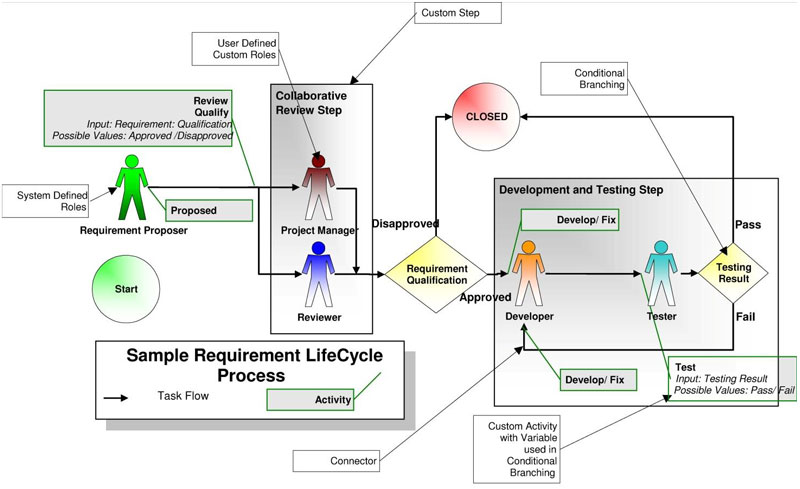
In the Sample Schematic Process the Human Figures designate the Roles. Please note that there are ‘Green’ Roles and the ‘Brown’ Roles. The difference between the Green and Brown are: the Brown Role is a Hard Role as defined by YOU. On the other hand, a Green Role is a System-defined Role as anyone can play this Role. For example, in the sample schematic a ‘Requirement Proposer’ can be anyone and it is automatically assigned to the person whoever has created the new Requirement. If you wish to use the same Proposer in your Process uses the Green Role (and Kovair will know who the person is playing that Role for the particular Requirement). You can have as many Roles as your process demands with whatever names you wish.

2. Steps

Steps help break up a long complex process into modular elements with lesser complexity and duration. It also serves the purpose of high-level description of your process. For example, your Issue Resolution process may have the Steps: ‘Review’, ‘Development’ and ‘Test’. At any point of time a Requirement or an Issue can belong to exactly one Step. Steps allow you to answer the questions like ‘How many Issues are in the Development Step?’ or ‘What percentage of Requirements are in Review Step?’ You can have as many Steps as your process demands with whatever names you wish. In the Sample Schematic Process, the large Gray rectangles designate the Steps.

3. Activities

The atomic units in a Process are called Activities. Activities can be nested within a Step (and can be performed by a Role). Examples of an Activity are: ‘Review’, ‘Implement’, ‘Fix’, ‘Test’. In a Step, the Activities can be sequential or parallel and connected to each other by a Connection. As part of the Process execution, when Kovair comes to an Activity, it creates a Task for the user who is assigned to the particular Role. You can have as many Activities of your choice in each step. In the Sample Schematic Process the small Light Gray rectangles with line attached designate the Activities.

4. Join Nodes

In a Process, often multiple parallel branches merge together in order to go forward. The node at which the connectors merge is called a Join Node. It is also referred to as a ‘Merge Node’, ‘Synch Node’ or ‘Rendezvous Node’. In the Join Node it is possible to define a Forwarding Policy which tells the Process when to move forward. Kovair allows two types of Forwarding Policies – Count or Percentage based.

EXAMPLE:
If there are 10 different paths coming to a Join Node from 10 Reviewers of a particular type of Requirement, the Process Designer can say go forward only when Count is 10, which means wait till all the Reviewers complete their review task.
Alternatively he can also specify go forward when Percentage is 60, which means if at least 6 of the reviewers complete their tasks the process can move forward. The last policy is also called quorum-based policy.

5. Wait Nodes

Kovair ALM allows five different types of processes to run simultaneously. They are: Project-level Process, Release level Process, Module-level Process, Issue Process, and Requirement Process. Kovair ALM also allows synchronization between these processes to model real-life process requirements. An example of this: The interdependencies that exist between a Release (or, for that matter a Project) and all the Requirements & Issues which are planned for that Release. An organization may have a Release process which says, ‘unless all the individual Issues are Fixed/ Unit Tested’ AND ‘all the individual Requirements are developed/ Unit Tested’ we CANNOT go into an ‘Integration Testing’ step of the Release process. Kovair ALM allows the Release Process to have a Wait Node which will wait for all the relevant Requirements and Issues to satisfy certain criteria (in this case, pass their own ‘Unit Tested’ step). It will continuously check for this criterion to be satisfied and ONLY when it does will the Release move to the ‘Integration Testing’ step by creating a task for the appropriate role, say for the ‘Integration Tester’. It is important to note here that it is not necessary to have the individual Requirements and Issue processes to be in place to utilize this handy feature. Even when Requirements & Issues follow a manual, State-based Process (by manually changing a Status field) the Release process can still utilize this synchronization method.

6. Delay Node

A Delay Node allows a Process to pause for a predetermined amount of time (in Hours, Days, Weeks…) or till a date before it proceeds to the next step. This is useful for a Process where certain steps can be traversed only after a particular date or a minimum time is to be given between two steps. It also works very well in escalating issues that are not dealt with on time.

7. Variables in a Process

To control the flow of a Process, any system or custom field of the entity (Requirement or Issue) as well as Project, Release or Module may be used. In addition, a Process may include Process Variables that have the limited scope of the Process only. Any of these variables may be used in the Step, Activities or in any of the other Node types.

8. Conditional Branching

Very few real-life Processes are simple, linear and sequential. Often, Processes follows alternative paths based on different criteria. Kovair ALM allows you to add Conditional Branching both between Steps (and between Activities in a Step). The condition can be simple or complex by using AND, OR, NOT and multiple conditional statements. Typically in one or more Activities before the Branching Condition one or more Variables are set by the Roles during the execution of the corresponding Tasks. And the Conditions in the Branching are expressed in terms of those variables. In the Sample Schematic Process, the yellow diamond shows the Conditional Branching. The variables used in the Conditional Branching are shown in the Activities (with their possible values in italics). You can have two or more branches out of a Conditional Branch based on different criteria.

9. Rules on Entry and Exit

To make the Processes even more flexible and powerful, Kovair ALM platform has provision to define rules consisting of Condition and Action for entry and exit of every node. The rule definition is similar to the Policy Engine described earlier in this whitepaper. A typical example of this feature is: Notify the Project Manager at Exit of every step in the Release Process (so that he knows exactly what is happening for a Release).

10. Automatic Layout

One of the most useful features of the Process Designer is its ability to automatically do the layout of nodes. This smart tool can be used to focus on selected items as well as on the complete drawing. Rarely does one need to reposition nodes after the automatic layout has been done. This is a life-saver especially when designing large complex processes.

11. Online Documentation

Another useful feature of the Process Designer is the documentation of a Process along with the functional design. It is not necessary to create a separate MS Visio like drawing to document a complex process. To aid in the documentation, Kovair ALM provides tools like Text Label and URL connected to any node or connector (Static Text and Multi Row/Column Table), thereby generating documentation on the fly.
Kovair process automation

Fig: Schematic of Sample Requirement Lifecycle Process

Process Tool Selection Guidelines

Introduction

This article discusses Process tools for Software Development and IT Management and what are the major functionalities, one should look for in such tools. There are not many tools which can be categorized as pure-play software development process management tools. Most of the process tools are included as part of the development and management point tools. For example, a bug tracking tool may have a process automation engine to define the bug fixing process. Similarly, a Help Desk tool may have a process to manage help desk. There are a few generic process tools focused on different Development and IT processes within the same tool. These multi-application process tools which facilitate the implementation of multiple processes like Requirements Management, Issues Management, Test Management and Release Management processes are becoming more and more popular. The generic process tools broadly fall into two categories – Methodology Specific and Methodology Agnostic. Methodology Specific tools are designed around a particular methodology. Their processes are implicit and embedded in the user interfaces which are specific to the methodology. There are a few commercial tools available which are specific to methodologies such as SeRUM, Agile, Phase-Gate, etc. The Methodology specific process tools have an advantage of quicker and more faithful implementation of the methodology. The disadvantage of such a process tool is its limited adaptability, especially when the organization wants to deviate from the strict definition of the methodology. A methodology specific process tool has a little room to incorporate deviations from the methodology it originally intended to implement. Since, over the long term every organization modifies its processes to reflect changes in the organization, business and technology environment, methodology specific process tools have a shorter shelf life. On the other hand, a Methodology Agnostic Process tool is more generic and as the name suggests, can implement a wide range of methodologies. Since it is not designed for any particular methodology, it may take a longer time to implement a methodology unless it comes with some built-in templates. For organizations following a proprietary or a modified methodology, a Methodology Agnostic Process tool is the best option. The investment in a Methodology Agnostic Process tool goes a long way as it should be able to accommodate the changes in the business and technology scenarios in the future years. In this article we will discuss the general features and functionalities we should look for in a generic Methodology Agnostic Process tool which can be used for a wide range of processes in different life cycles.

Task based vs. State based processes

Most of the development tools have state based process capabilities. A state based process allows the process to be in one state alone at a given time. This is good for a simple process, but difficult to implement for a complex process which requires parallel activities. On the other hand, a Task based process supports multiple parallel activities in the process. This allows tasks to get assigned to multiple process owners where each may be involved in doing different things.

Multiple independent processes for each application

For certain types of application development, support of multiple processes is important. For example, a Helpdesk application may have different processes for different departments. It is possible to create a single monolithic process with branches for each different departmental process. However, with a tool that supports multiple independent processes for a single application, it is easier to design, develop and manage different processes in a more structured way.

Visual drag and drop process designer

Different process tools have different user interfaces to define the process. The design interfaces include graphical drag-and-drop interface, state tables, spreadsheet-like interface and the ones with different levels of coding and scripting support. A visual drag-and-drop interface helps process designer to visualize the process as it is being created. The process is faster and easier. A visual drag-and-drop process designer also reduces the implementation and maintenance cost of a business process in contrary to the code based process engine.

Task assignments to multiple users/roles based on policies

One should be able to assign a single activity to multiple owners in a single step. In addition, there should be ways to support queuing of tasks, load balancing, task sharing by multiple owners and independent owners of a single task among others. For example, sending a change request to a change board of 5 persons should be achieved in a single step rather than 5 different steps. A State based process cannot support any of these needs.

Conditional branching

This is one of the basic requirements of a Process tool that is missing in many tools in the market. Conditional branching capability of a process tool allows automatic selection of the next activity based on the complex conditions defined in terms of various variables of a particular item. For example, an Issue follows a particular path if it is a defect and, a different path if it is an enhancement request. This routing should automatically happen based on the field values.

Merging/Joining with quorum-based forwarding policy

Multiple parallel activities in a process often need to be merged/ synchronized to move the process forward. A quorum based merging allows the process to move when not all but a pre-defined percentage of the previous activities are completed. For example, when a Requirement is sent to a review board of 10 persons, the quorum based merging will allow the process to move forward if 80% of the review results are completed and have passed.

Process modification without affecting running processes

In any organization, processes change with time. There is no single ideal process which can address all needs for ever. One should be able to modify processes as the old process continues to be running for the existing items. This allows the managing of the process changes much easier and allows for a smooth transition between the old and the new process.

Restart process at any time for multiple items

When a process is changed one may need to run the new process for the existing items. With some advanced tools, it is even possible to start at a particular step within the new process rather than at the ‘Start’. This allows users to make the process run for an item from the point till which it has been executed in the previous process.

Process versioning

This is especially needed for any organization that wants to implement CMMI or similar compliance processes. Just like any change management, it is important to track the changes in the process by tracking the versions. So, look for a tool which has built-in versioning capability for the process.

Synchronization among multiple processes

This feature may not be necessary for a single application process tool. However, the need for this feature is critical to a multi-application process tool that allows implementation of multiple applications like Requirements Management, Issues Management, Test Management, and Release Management..For example, a Release Process should wait for the integration Test to start until all the Requirements and Issues included in that Release are implemented/ fixed and unit tested.

Process activities triggering actions in external tools

Most organizations use various development and management tools from different vendors. Due to the lack of integration, and built-in process in most of the point tools, processes gets implemented in isolated pockets of the lifecycle. The process tool should be able to trigger an action in another remote tool and help in achieving cross tool process implementation. As you understand from the above process tool selection criteria, it is important to spend some time thinking and discussing about the process needs with your vendors. Even if your organization is not currently using any defined “Process”, you should do this before making a final selection of ALM tools. Ignoring this fact may lead to an investment in a wrong tool that may not help the organization as it grows and matures in its desire to implement a process methodology.

Kovair Value Proposition for Tools Integration

Introduction

Kovair, a technology leader in the domain of Integrated Applications Lifecycle Management – ALM offers several solutions such as Requirements Management, Test Management, Issues and Change Management. Kovair is known for its following four technology value propositions, no matter what specific application or solution you want to build with it. 100% web based solution that supports multiple major browsers IE, Firefox, and Chrome with no client-side software installation. Drag and drop interface and easy codeless configuration of desired applications making it a very viable and flexible long-term investment having very high ROI. An excellent Task based, built-in Process, or Workflow Engine called the ‘Omniprocess’ that allows to configure and maintain any business process within the tool using a drag and drop visual designer. A SOA architected Enterprise Service Bus ‘Omnibus Integration Platform’. It facilitates integration of different tools or software by building thin adapters for each of them. It also allows bidirectional data transfer between the tools. Other than just synchronization of records between tools, Omnibus also allows synchronization of relationships, comments and attachments associated with each and every record. With the above basics of Kovair succinctly outlined, let us focus on the value propositions of the Enterprise Integration Bus – the Omnibus Integration Platform in this particular paper.

The Omnibus Integrations

Almost every organization has separate teams for working on different phases of application development. These teams work in silos and prefer to use their own set of tools popular in their own domain. This has made all the phases disjointed from each other and has made the process of tracking and maintaining the progress of a release very tough. Kovair helps to resolve this communication issue in two dimensions. For seamless communication between multiple phases of Application Lifecycle Development, Kovair offers a 100% web based single data repository where data of all phases can be maintained, traced and tracked for better predictability and ensuring quality at every step. However, this is not the case in real life as most organizations use best-of-breed tools from multiple vendors which seldom have interconnectivity and data transferability unless point to point integrations are carried out. Even different tools from the same vendor are not typically connected with each other. Here the second dimension of Kovair’s integration capability comes into play.

To eliminate the need for point-to-point integrations – where integrating 5 different tools requires 10 total integrations, Kovair developed the SOA based Omnibus technology. In a bus or hub like architecture for integrations, 5 tools integrations would require only 5 adapters, thus bringing in considerable savings in both the development and maintenance costs during upgrade to the newer version of the tools. Kovair’s Omnibus Integration Platform is technology, vendor and location agnostic. This means Kovair can be integrated with other tools that may be using Oracle database or running on a Linux platform, or are in different locations. Kovair’s web based architecture facilitates remote communication and collaboration among tools and their users. In today’s multi-location and outsourced development environment, it is necessary that a Requirements Management tool based in Boston communicates with a Test tool based in Bangalore. The Omnibus Integration Platform is very capable of delivering on this essential need. The following figure provides a visual representation of multiple integrations from Kovair that can be described as “Kovair Model” for ALM.

Tool Integration

The Advantages of the Omnibus Technology

The Omnibus technology has a few unique advantages that are enumerated below.

  • The Bus or Hub versus point-to-point integrations, as discussed above brings considerable savings in development and maintenance costs.
  • Web Services Standard or SOA architecture makes it open to integrate with any type of software from any vendor including homegrown tools or databases for integrations.
  • The data layer is separated from the business layer and as such no hard coding of business rules has to be carried out for the integrations. Business rules are configured for each application as desired by the user in a codeless manner.
  • Kovair Omnibus integrations enhance the process capabilities of other tools that do not have a built-in process engine.

The Competitive Edge

SOA based ESB architected Kovair Omnibus Integration Platform is backed up by a 100% web based central repository system. This gives manifold advantages to Omnibus in comparison to other competitors. The uniqueness of Kovair Omnibus Integrated platform is given below.

  • Proprietary SOA based ESB architected integration platform
  • Task and Web based Automated, Graphically Configurable Workflow with Notification, Eliminating manual hand-offs
  • Policy engine allowing users to configure business rules for –
    • Event based actions
    • Sending notifications o Perform scheduled activities
    • Escalate information
  • Helps to achieve cross tool End-to-End Traceability
  • Built-In Cross Tool Data Based Real-Time Reporting and Dashboards increases predictability and quality of a release.

Summary

For organizations having prior investments in multiple tools from vendors such as IBM, HP and Microsoft, Kovair offers an excellent value proposition to enhance ROI in two major ways. The first one is by providing the capabilities to integrate tools from any one of these or other vendors at a relatively low cost. The second one is by filling out certain gaps in point tools that may not exist at these companies. Kovair has a complete list of existing and planned integration adapters on its website.

Kovair Plug-In for Eclipse Development Environment

Introduction

Eclipse is known as an industry’s leading Open Source platform for Java based software development. Eclipse as an IDE (Integrated Development Environment) is mostly used by the developers. Today, with the growing involvements of multiple stakeholders in almost all phases of software development lifecycle, attaining collaborative development environment has become a mandate for them. This is, regardless of their geographical locations and job roles. One also cannot rule out the necessities of adopting disparate ALM tools, and often some of them are outside the scope of the Eclipse environment! Now, the question is ‘how do we enable Eclipse developers to share information back and forth with other stakeholders from within their familiar Eclipse environment?’ ‘Kovair Plug-in for Eclipse’, a platform for Eclipse developers, ensures collaboration among the stakeholders throughout the development lifecycle via synchronization among disparate ALM tools. While working with this Kovair plug-in, the access of Eclipse developers can be extended to the other artifacts like Requirements, Design Artifacts, Test Cases, Tasks, and Defects originating from diverse ALM tools without requiring them to leave their preferred IDE. Kovair plug-in for Eclipse is a dream come true for Java developers who wish to use a single tool environment, both for doing their primary development jobs and collaborating with other teams. This plug-in helps any organization to provide an enhanced platform for their developers, where its established processes, tools, and practices can be seamlessly integrated.

How does the Eclipse Plug-In Work?

Talking about the Kovair plug-in for Eclipse, the integration framework of Kovair, also comes into the picture as both are complementary to each other in terms of their functions. Kovair Omnibus Integration Platform offers an open and seamless integration framework backed up by a central repository with all essential ALM services such as collaboration, traceability, process automation, security, reporting and analytics based on cross tool data. The Kovair Omnibus enables enterprise organizations to make lifecycle tools active participants in the overall ALM process as part of an Service-Oriented-Architecture (SOA) based ESB architected platform.

Kovair has built an open ‘Omnibus Plug-in architecture’ that talks to individual tools integrated with the Omnibus Engine through Adapters or Connectors. The plug-in for Eclipse is also SOA-based similar to Kovair’s Omnibus architecture. Using Kovair Omnibus platform and its SOA based APIs, any organization can create its own set of plug-ins for their homegrown tools. Kovair plug-in for Eclipse extends the Eclipse IDE with menus to connect to Omnibus which represents an organization’s TIDE (Tools Integrated Development Environment). Eclipse users, generally the developers, can connect to Omnibus by using authentic user credentials in the Login dialog. After successful login, they can see the Projects and the Artifacts (for example, Requirements, Design items, Test Cases, Tasks, and Defects) in a tree-like format, exposed in an Explorer window. Without leaving the Eclipse IDE, they can navigate to see the list of Requirements, Test Cases, Tasks and other items. Though artifact items can be exposed to developers, the options to view, update, add, and delete items depend on their access privileges. Kovair plug-in for Eclipse, talks to the Omnibus Service through open APIs that collect data from integrated ALM tools. The developers are then able to work on them as per given privileges. Once the changes are made on the collected data from Eclipse IDE, Omnibus Service updates them in respective ALM tools.

Tool Integration

Fig: Kovair Eclipse Plug-in Interface


JUnit (Unit Testing tool) and ANT (Build tool) plug-ins available in Eclipse environment are also extended by Kovair. This facilitates Eclipse users to create new items like Defects in the context of a failed test case in JUnit and build failure in ANT.

Example Scenario

Let us consider that an organization XYZ uses Rational RequisitePro for managing Requirements, Eclipse IDE for development, HP QC for Testing, and Kovair ALM for Process and Project Management. The organization adopts a Tools Integrated Development Environment (TIDE) using Kovair Omnibus where Project stakeholders follow the sample lifecycle scenario as described below.

Tool Integration

Fig: Kovair Eclipse Plug-in Interface


The above scenario shows how Eclipse developers can collaborate with other teams or stakeholders throughout all the phases of software development lifecycle, and become a part of the overall process. Kovair plug-in allows them to do all these activities without leaving their preferred Eclipse environment.

Why Omnibus Plug-In for Eclipse

Increased Productivity

With Kovair Plug-in for Eclipse enabled, developers get easy access to Requirements, Design items, Test Cases, Defects, and other artifact items directly from within their IDE. These items may originate from different ALM tools, but developers can simultaneously operate on all these items from their native environment. Developers can even update the status of defects from the IDE, without logging into the defect management system. The plug-in also reduces a lot of training time for Eclipse users that is otherwise required to learn different tools.

Efficient and Timely Data Capture

Synchronized activities of stakeholders and timely completion of their tasks matter a lot for a software development project to be completed within a given deadline. Developers often find it difficult to submit their work results in a timely manner. This happens when they need to switch between tools for reporting, or completing their tasks. It has been observed that developers are less interested to leave their familiar IDE and work in different other tools for some other purposes. This attitude puts off tasks that require access to a different tool to the last minute. More often than not, they forget to accomplish the tasks. By virtue of Kovair Plug-in for Eclipse, the users can develop codes, do code validation using LDRA, perform unit testing using JUnit, create software builds using ANT, and report the results immediately – without leaving the Eclipse IDE! This is a definite plus for capturing work outputs more efficiently.

Improved Process Participation

Generally, developers express concerns about introducing a new process to their existing work system. They perceive process as something having overheads that puts extra workload on them beyond their regular jobs. With Kovair Plug-in for Eclipse, they can easily view the process and tasks from within the IDE, work on them, and readily mark the tasks as completed when finished. In this way, they can become a part of the process – even without knowing it! Kovair process automation framework does the job from behind the scene. It generates tasks as per process design, and then once a task gets completed, it automatically generates the next task for appropriate stakeholders. Kovair’s built-in Process Engine, and Plug-in for Eclipse, together remove the complexities of enforcing automated process, and ensure better acceptance by all stakeholders.

Established Cross-tool Traceability from Eclipse

Kovair Eclipse Plug-in allows users to establish traceability links with artifacts from different tools. The links are stored in Kovair and are visible to all Plug-In users. This enables users to link their code artifacts like files, classes and methods to Design Elements in the modeling tool or with Defects in the defect management tool. Useful information like which method was modified to fix a particular defect can now be easily found by all Kovair users without even leaving their Eclipse environment.

Improved Quality

Accomplishing tasks with quality outcome often requires a wider vision and an extended accessibility to related information or knowledgebase. In an IT environment, linked information from disparate tools need to be exposed to the right stakeholders at the right time – for them to come up with ‘Quality’. This plays a big role in the success of IT projects. By virtue of Kovair Plug-in for Eclipse, developers have ready and real-time access to the Requirements and Test Cases from within Eclipse IDE. Thus, they remain more informed to perform better coding and testing activities. In addition, with Omnibus plug-in support, “Review Tasks” created in other Project Management tools show up in the IDE environment which allows Project Managers and Team Leaders to do their review jobs within the IDE and submit the results immediately. All these activities result in the creation of a better quality software.

Detail Metrics

Using Kovair Plug-in for Eclipse, developers, testers and managers are able to capture a lot more micro level data like code analysis results, unit testing results, test coverage results, build results, and other detailed information. Project stakeholders are also able to view the analysis and reports based on these detailed data in Kovair, or any other Project Management tool integrated through Omnibus.

Enhanced Visibility

Kovair Plug-in for Eclipse allows developers to send regular reports on their coding, unit testing, bug fixing, and review tasks. Since the stakeholders work from within their familiar IDE, the scope of recording granular level information is higher. For example, by virtue of Omnibus integrated framework, data from associated tools can be transmitted to a Project Management tool for creating real-time reports. This results in greater visibility of the Project Managers on the overall project status as well as progress details.