

Project Background
After the merger of the two large chip tool companies, the Corporate Management decided to migrate existing Corporate ERP Application from Oracle to SAP. This is a huge initiative that spreads over a time span of two years. Some of its main areas of coverage include – mapping of existing functionalities available in Oracle with those of SAP, identifying GAPs in functionalities between systems, hiring of resources for development of new capabilities, procuring software licenses for the ALM system and implementation. Involved teams of the project were located in different geographical locations / time-zones. The Project aimed to bring savings through introduction of new capabilities, reduction in costs, increase in efficiency, integrated tools for managing operations and optimum resources utilization. The Project lifespan consist of following phases- Pre migration
- Design
- Build
- Test
- Deploy
- Post-migration Support
Challenges and Risks
This is a very large enterprise level project, which is to be completed with allocated resources within a fixed time frame.- Managing and monitoring of this Project was very difficult due to its size. The Project scope covers 12 Functional Tracks which are further categorized into 50+ Functional Sub-tracks and dealing with 20+ Technologies.
- Around 1300+ High-level Change Requirements were identified for the Project and these Change Requirements were categorized in Functional Tracks and Functional Sub-tracks. To implement these Change Requirements, 2100+ Delivery Packages and 2200+ Project Docs were created for the Project.
- Keeping real-time info available for teams was a big challenge as Project was being executed in distributed environment with large teams (600+ Users) located and working from different geographical locations across continents.
- To manage the Project Lifecycle, the organization was using different tools which were working in isolation and there was no integration
- Timely execution of all Lifecycle Phases (Planning, Design, Build, Test and Deployment) was very crucial and challenging for this Project.
Kovair Implementation
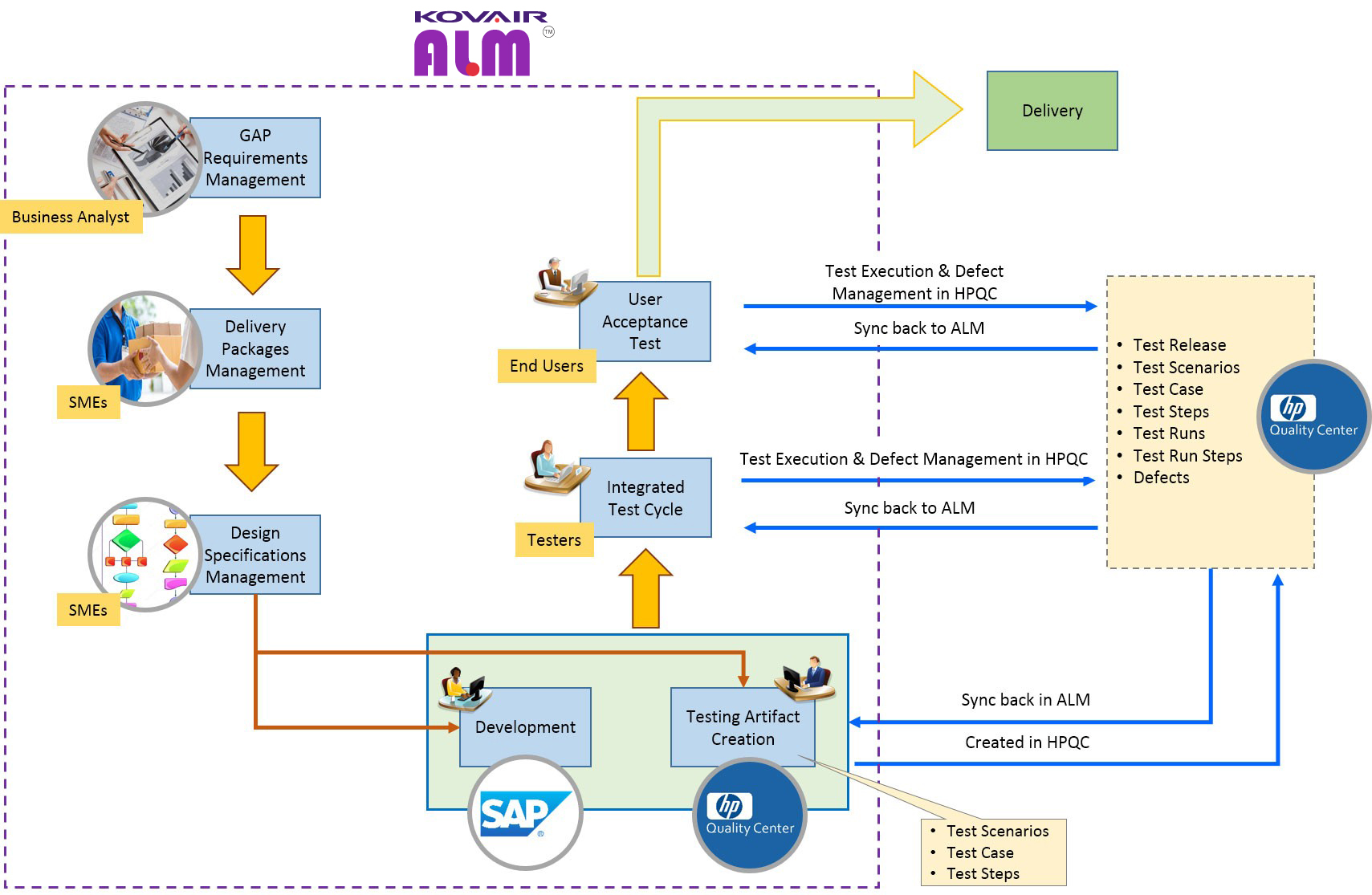
Kovair Application Lifecycle Management Solution – the ALM was chosen by the Management Board of the implementation team to meet the requirement and challenges of this Project. A brief summary of what Kovair configuration successfully achieved is given in the diagram below.
Masters
Kovair brought a holistic approach to Project Management by creating Objects within its ALM. This helped to capture the master data of the Project.- Functional Tracks – This object maintains information such as Owner and Lead for the Functional Track.
- Functional Sub-tracks – This object maintains information such as Functional Analyst, Associated GAPs, and Delivery Packages for the Functional Sub-tracks.
- Technologies – This object maintains details of Technologies used in the Project.
GAP Requirements
GAP Requirements are a critical part of this Project. Different Project Teams were formed for each Functional Tracks and Functional Sub-tracks and were entrusted with the job of compiling information on the differences between existing Oracle system and proposed SAP system. All these information was then documented in Kovair ALM Requirements Management module as “GAP Requirements”. During the lifecycle, information such as Business Requirement, Solution in Existing Template, Proposed Solution, Owners, and Disposition Methods were maintained. The GAP Requirements were processed through the GAP Requirement Management Function that is one of Kovair ALM capabilities. Once the GAPS were ‘Approved’, Functional Analysts were able to create Delivery Packages to fulfil the GAP Requirements.Delivery Packages
Delivery Package is the vehicle for implementation of GAP Requirements in the proposed system created after the approval of Requirements. During its lifecycle, the Delivery Package captured details of all the phases like Object Type, Functional Complexity, Build/ Technology Complexity, Owners (Functional Analyst, Dev Lead, Developer), Location of FA and Developer, Target Delivery, Plan Dates (FS Completion, Build Completion, FUT Completion), and Actual Dates.. Delivery Package in Kovair is processed through Delivery Package workflow Process, which takes control of the Deliverable Lifecycle through Activities such as Creation of Functional Specifications, Review of Functional Specifications, Creation/ Upload of Test Cases/ Steps in HPQC, Perform Development, FUT Management, Integration Test Cycle Management, and UAT Management. The Delivery Package Workflow Process in Kovair works in synchronization with HPQC Test Management Data, which is updated in Kovair ALM on real-time through Omnibus Integration Bus in the Kovair Platform and its bi-directional integration with HPQC – the main factors in FUT processing, Integration Test Cycle, and UAT Management.Project Documents
Project Documents are objects in Kovair ALM that act as repository of Project related documents. This object maintains Project related documents such as Business Process Document, Security Requirements, Test Management Documents, and Training Documents.Test Management
Test Management aspect of this Project are maintained and managed in HP Quality Center (HPQC). Test Management data is crucial for the Project and we have established integration between HPQC and Kovair ALM through Kovair Omnibus Integration. To capture HPQC Test Management Data we have created entity objects such as – Test Scenarios, Test Cases, Test Steps, Test Runs, Test Run Steps and Defects Management in Kovair ALM. HPQC – Kovair ALM Integration through the Kovair Omnibus synchronizes data between HPQC Test Management Objects and Kovair ALM Test Management in real-time and whenever there is any change (Creation/ Update of records) in HPQC; it is automatically synchronized in Kovair ALM Test Management module.Kovair ALM Processes
One of the major strengths of Kovair ALM is its enterprise class web configurable process workflow engine. Setting up multiple workflows with this capability is like drawing Visio diagrams with embedded business rules at each process step/ activity. The following process workflows are two such processes, which were configured for this solution.GAP Requirement Management Process
GAP Requirements are the crux of this Project and senior stakeholders participated in the decision making process to review the business use-case, proposed solution, risk/ mitigation plan, criticality, required budget for fulfilling, and other important aspects. It involves collaboration between different stakeholders for prioritization, feasibility check, planning, delivery creation and closure.
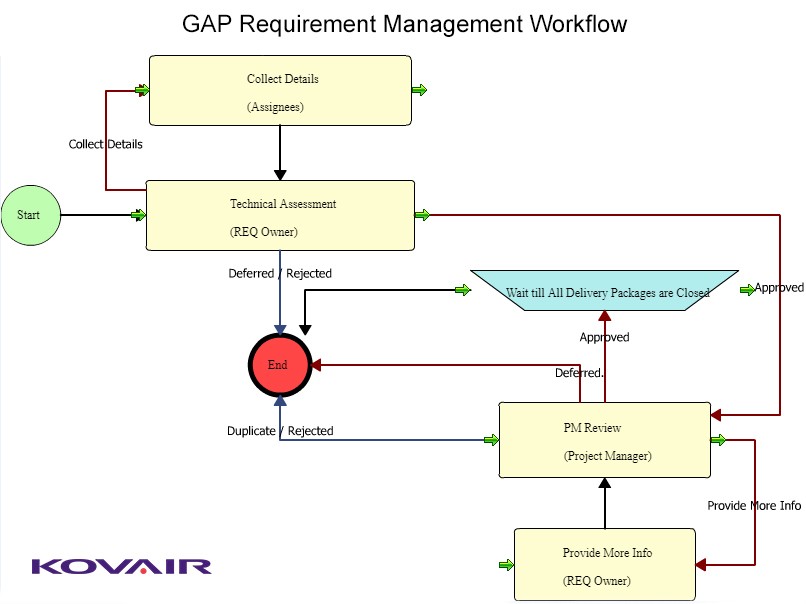
Kovair configured and implemented a task-based workflow across all these activities. The highlights of this automated workflow and the benefits obtained out of it are given below.
Process Highlights
- GAP Requirements are assessed for Technical Feasibility by Requirement Owner.
- Technically Feasible items are Reviewed by Project Manager and based on budget, criticality and priorities these are Approved/ Deferred.
- Delivery Packages are created for the implementation of the Approved GAP Requirements.
- Once All Delivery Packages are closed, the corresponding GAP Requirement also gets closed.
Process Benefits
Process Highlights- Auto generation of Tasks for the activity owners as per configured process eliminated the risk of missing any activity in the entire workflow.
- Tracking the progress of the process graphically helped users to take informed decisions and improving the quality of delivery.
Delivery Package Management Process
Delivery Packages are the vehicles of implementation of GAP Requirements in the Project. The lifecycle of Delivery Package starts with creation of specification documents and then traverses through development, test artifacts creation, testing before final Delivery. The Testing is done in HPQC while the Delivery Packages are maintained in Kovair. Kovair omnibus helped the Organization to achieve a seamless workflow across the tools by integrating these two tools through Kovair Omnibus.
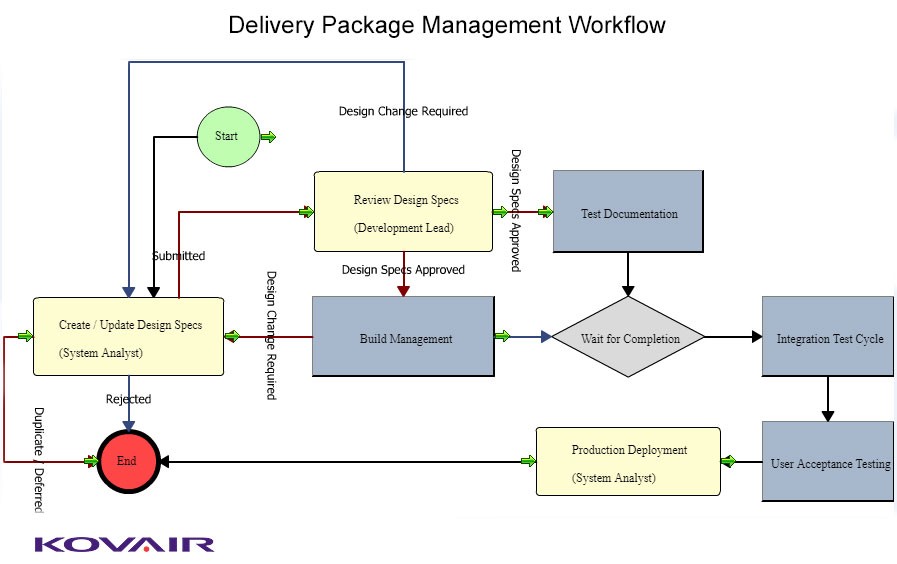
Process Highlights from the Kovair Process Workflow Configuration:
- System Analyst creates Design Specifications for Delivery Package.
- Development Lead reviews the Design Specifications and Approves/ Changes as needed.
- Parallel tasks are generated on approval of Design Specifications.
- The Developer starts Development work.
- The Tester starts working on Test Artifacts Creation (Test Scenarios, Test Cases and Test Steps).
- After the completion of Development and Test Artifacts Creation, the Integration Test Cycle (Test Execution, Defect Logging and Closure) is performed.
- User Acceptance Testing (Test Execution, Defect Logging and Closure) is performed after the completion of Integration Test Cycle.
Process Benefits
- Auto generation of Tasks for the activity owners as per configured process eliminated the risk of missing any activity in the entire workflow
- Task based workflow along with integration between Kovair ALM and HPQC allowed the organization to achieve central governance cutting across different tools
- Tracking the progress of the process graphically helped users to take much informed decision on improving the quality of delivery
Reports & Dashboards
Kovair ALM has built-in reports and dashboard capability. The users can easily configure several types of reports such as Tabular, Word and Graphical (Trend, Distribution Metrics, Pie chart). Knowledge on coding is not required. The reports have drill-down capabilities that enable users to review the records displayed in selected segment of the report. Some of the sample reports that were used in this project are given below.Open GAP REQs by Criticality and Status
This report helps Management in monitoring the progress of Project by segregating the GAP Requirements based on Criticality and Status.

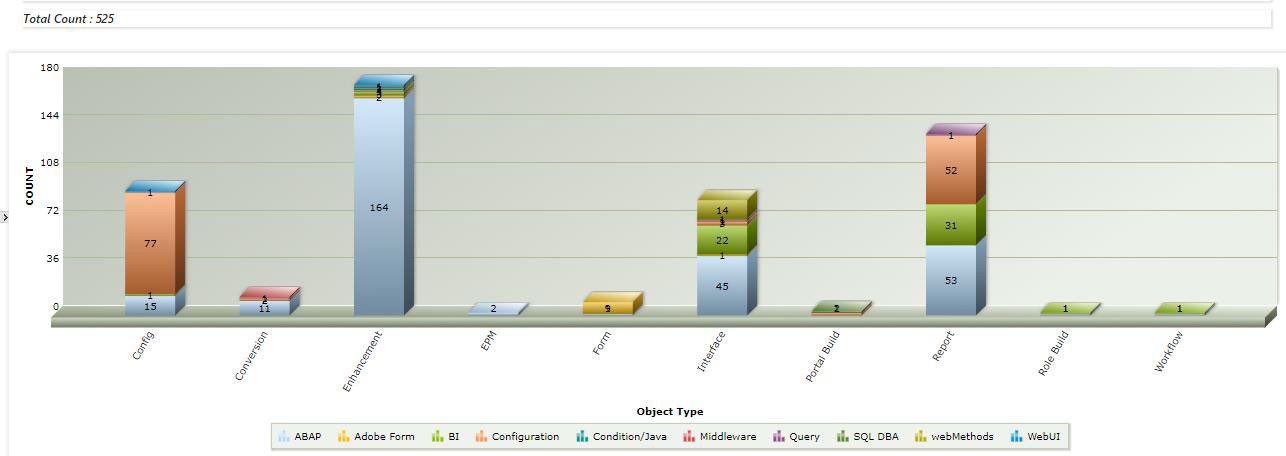
Open Delivery Packages by Object Type and Technology
Major properties of Delivery Packages include Object Type such as Configuration, Conversion, Enhancement, Form, Interface, etc. and Technology such as ABAB, Adobe Form, BI, Middleware, Query, SQL DBA etc. This report helps the management to visualize the overall Project landscape.
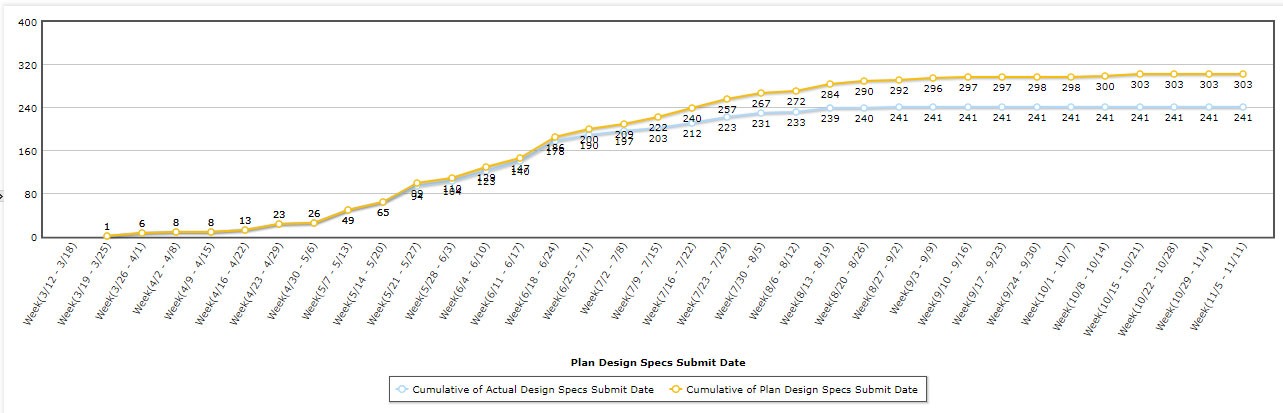
Open Delivery Packages Design Specs Plan V/s Completion Trend
This report helps stakeholders to monitor the progress of Design Specs Completion against Plan.
Open Delivery Packages by Object Type and Build Complexity
This report helps Project Managers in the management of Delivery Package by Object Type and Complexity.
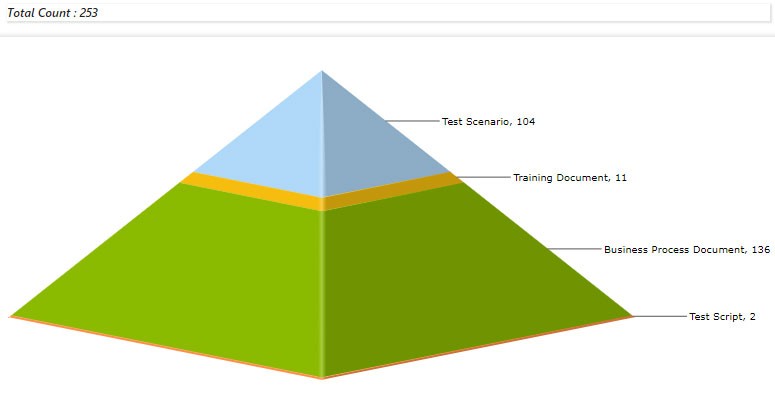
Project Documents by Document Type
This report depicts the volume of Project Documents by Document Type.
Benefits Achieved
- GAP Requirements are crucial for the success of this Project. Kovair ALM Requirements Management capabilities have helped in Capturing, Collaborative Review, Approval, Management and Processing, and Monitoring of these Requirements.
- Management Delivery Packages was crucial as Test Management artifacts were being maintained in HPQC. The Integration between HPQC and Kovair ALM through Omnibus Integration has helped to smoothen the Processing (Design, Development, Build, Test and Deployment) of Delivery Packages of this Project.
- Project Teams were situated at different geographical locations and in different time zones. Kovair ALM, the 100% Web based Application without any client side software has helped in real-time information sharing. This has increased productivity of Project Teams and Users and significantly reduced the waiting time of response
- Kovair ALM Reports and Dashboards have helped in delivering real-time Project information for Management and different levels of Stakeholders to keep the project on time and within Resource budget.
- Above all, without the Kovair ALM Solution, major ERP migration project could not have been pulled off on time, on budget, and with the quality that was achieved.