
Kovair is now part of SurgeONE.ai | Same experts, even more power.

Month: April 2014

Enterprise Architect, developed by Sparx Systems, is a visual tool used for designing software applications. Today’s business applications rarely live in isolation. Users expect instant access to all business functions an enterprise can offer, regardless of which system the functionality may reside in.

Kovair Support for Enterprise Architect Integration

‘Kovair Enterprise Architect Integration Adapter’ integrates Enterprise Architect, popularly known as EA, with other ALM and ITSM tools by exposing the Packages, Models, Elements and the relationships among them to Kovair Omnibus Integration Platform. This enables these artifacts to be synchronized to any other tools connected to the Omnibus platform through its adapter. End-to-end traceability can be maintained over time using a continuous synchronization process that allows updates made in connected tools to be reflected in EA. Typically, an EA user can directly add a Package, Diagram Model, Requirements, Use Cases, Actors, etc. or even a complete Package along with all its elements and diagrams from EA to Omnibus.

‘Omnibus Integration with EA’ facilitates two way communications of user-defined mapping of different Artifact Attributes to EA objects and tagged values. Direct and automated exporting of EA elements to a connected ALM tool will increase the utility of the EA tool significantly.
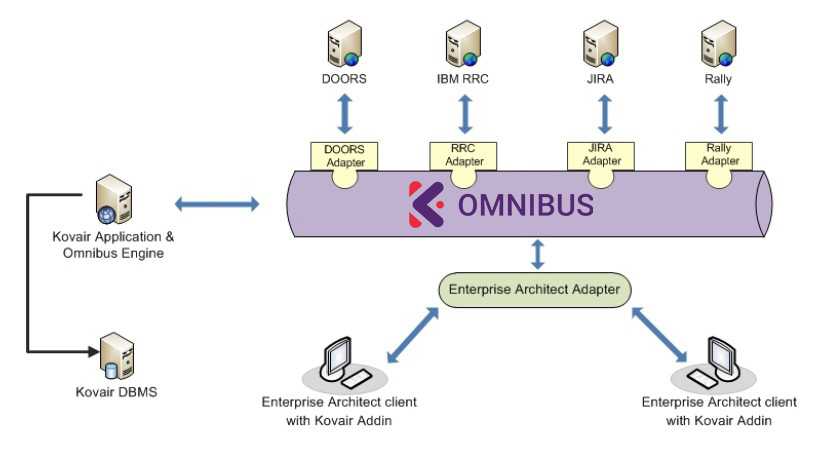
Enterprise Architect Integration Adapter Architecture
Fig: Architecture Diagram

Features & Benefits

  • Ability to publish the EA Design Packages, Models and Design Elements to the Integration platform enabling other tools to set up Traceability relations with them.
  • End-to-End Traceability and change management can be maintained using a continuous synchronization process that allows updates made in other connected tools to be reflected in EA.
  • Ability to import Requirements from any connected Requirement management tool.
  • Support for almost all types of objects from Enterprise Architect
  • User-defined mapping of Artifact Attributes to EA objects and tagged values.
  • Support for bidirectional synchronization of artifact relationships, along with the link types as provided in EA.
  • Direct import/export of EA Artifacts from/to connected tools via Omnibus.
  • Allows multiple EA Projects to connect with each other simultaneously.

An Example of Enterprise Architect Integration

Enterprise Architect Integration with IBM RRC and JIRA

Enterprise Architect (EA) is a visual tool for modeling and designing software applications. It covers all aspects of modeling.

The Kovair Omnibus EA plug-in and adapter allow EA users to add Design Models and Design Elements as traceable items to the Kovair Omnibus EA Adapter. This would enable other users to link with this item using Kovair Omnibus plug-ins. The artifacts would then become traceable entities in the ALM ecosystem. It is also possible to synchronize these Design Elements with Requirements and other artifacts, being managed in different ALM tools that are connected to Omnibus.

In a typical Requirements management scenario, the architect prepares a Use Case Model in Enterprise Architect based on the requirements being gathered by the analysts in a different tool. Using Kovair Omnibus adapter for EA, the architect can pull in the requirements into EA through the Kovair Add-In for EA. Based on those requirements he/she can design a Use Case diagram model using various elements like the Use cases, Actors, etc. and also linking the relevant objects to one another. Once the diagram model is completed, he/she can push the entire model to Omnibus platform. Each of these objects from EA can now be sent to any ALM tool as traceable items and the ALM users who do not have access to EA can now view the entire traceability chain starting from Requirement, to Diagram Model to Packages and Design Elements (Use Cases, Actors, etc.). In addition, by using this data, Kovair Omnibus reports and dashboards can be configured to offer a better visibility to the management through various graphical and textual reports.

It is a well-known fact that the productivity of the teams increases rapidly when they use their preferred choice of tools to do their work. Kovair acknowledges this fact and helps organizations to increase their overall productivity by helping them to be integrated with best of the breed tools available in the market today. One such tool is Bugzilla, in the bug tracking domain.

Bugzilla is one of the popular online bug tracking tools in today’s IT market, developed by Mozilla foundation. Developers find it is easy to track, manage and resolve bugs using this tool.

Features & Benefits

  • Provides the bidirectional synchronization of bugs between Bugzilla and other integrated ALM tools.
  • Allows traceability relationships by linking Bugzilla bugs to other ALM artifacts like Requirements, Change Requests, Test Cases and Tasks.
  • Performs automated actions on bugs that are getting submitted from other integrated tools in the ALM ecosystem.
  • Ensures smooth tracking and resolution processes of bugs, spanning across multiple tools.
  • Provides collaboration so that all the stakeholders are in sync with the latest changes, thereby ensuring smooth propagation of changes and impact analysis.
  • Allows the team members to work on Bugs from their preferred tool environment and thereby increases their productivity.
  • Conflict detection and mediation
  • Scalable and robust enterprise level architecture
  • Support the Attachments and Comments between Bugzilla artifacts and artifacts belonging to other integrated lifecycle tools.
  • Support for users to configure integration rules and establish relations between objects of disparate ALM tools
  • Support for complete traceability, consolidated reporting and dashboards – all available through a web interface.
  • Customizations can be done easily using web-based codeless, mouse-click configuration screens.

Kovair Support for Bugzilla Integration

‘Kovair Bugzilla Integration Adapter’ provides smooth connection between Bugzilla and other external third party tools through Kovair Omnibus integration platform. The Bugzilla adapter uses the vendor neutral Omnibus integration platform to allow the synchronization of Bugzilla bugs with the various best of the breed ALM tools. This integration ensures transparency throughout the entire SDLC lifecycle process, automating the micro processes at the Requirement, Test or Bug level to the macro process that spans across the entire organization. Omnibus also enhances collaboration of various stakeholders’ using different tools.

Products, Product Versions, Components and Bugs from Bugzilla are exposed as traceable entities from the Kovair Omnibus Bugzilla Adapter. Bidirectional flow of data related to all these artifacts can be done through Omnibus to other connected tools.

The integration between Bugzilla and other ALM tools is based on an Enterprise Service Bus (ESB) architecture that requires one adapter per tool, ensuring easy maintenance and scalability.

Kovair’s ability to create and execute custom Workflows for any ALM entity enables the Bugzilla users to participate in the high level cross-tool processes of the Organization.

Kovair’s Omnibus plug-ins available for various popular IDEs like Eclipse, Visual Studio, Rational Software Architect and Rational Application Developer allow users of these tools to easily browse Bugzilla items within their own IDEs. They can easily collaborate by creating/ modifying these Bugzilla artifacts from their own IDEs. Kovair’s cross-tool reporting and dashboards capability allow users to keep track of Defect metrics being generated in Bugzilla.

Bugzilla Integration Adapter offers the followings:

Complete Traceability

Kovair Bugzilla adapter in association with Omnibus helps to establish traceability relationships between Bugzilla bugs and relevant artifacts from other tools.

Smooth Collaboration

Bug tracking and resolution involve a number of activities to be done by cross-functional teams. Team members involved in such processes should have full access to the bugs so that they can collaborate among themselves to get the bugs resolved in due time. However, it is often found that different teams use different tools during practice. So, collaboration among such teams can only be ensured by integrating those tools. Kovair Bugzilla Integration Adapter provides integration between Bugzilla and the other ALM tools to synchronize the bug information and thereby ensures smooth collaboration among stakeholders.

Increased Productivity

Kovair Omnibus allows integration of best of the breed tools irrespective of their vendors and platforms. Hence organizations can enjoy the benefits of tools integration and yet allow its resources to work on their preferred choice of tools. This improves productivity as employees can focus on other important aspects of their roles and do not have to spend time in learning new tools. It also avoids repetitive data entries in multiple tools while deriving cross tool reporting and metrics.

Automated Defect Creation

Kovair Omnibus adapter for Bugzilla allows automating the Bug tracking process starting from submission to resolution by configuring customized integration rules through a web interface. No hard coded logic is involved. For example, a rule can be defined such that a bug is automatically added in Bugzilla when a test fails in HP Quality Center.

An Example of Bugzilla Integration with BMC Remedy

Bugzilla Integration with BMC Remedy

Kovair Requirements Management

Kovair’s implementation of requirements gathering, parsing, management, traceability, base-lining and intelligent reporting in a process-driven methodology enables project teams to effectively manage and track requirements in a collaborative manner.

Kovair supports Requirements Management of many flavors – Standard as well as Proprietary methodologies or processes. All the capabilities necessary for effective and effortless Requirements Management are built-in in Kovair and are accessible through a highly user-friendly web interface.

Integrated ALM with Kovair and Microsoft

Microsoft can introduce Kovair Omnibus to their customers who are heavy users of HP, IBM, JIRA, and open source tools by offering integrations between Microsoft products and third party multi-vendor tools. Omnibus makes Visual Studio, SharePoint and TFS interoperable with all major competitor products and open source tools for which Kovair currently offers more than 60 different integrations.

Kovair Omnibus platform also provides seamless Migration and synchronization between HP QC, Microsoft TFS and MTM.

Integrated ALM with Kovair and IBM Rational

Kovair has successfully completed its “Ready for Rational” — RFR Certification from IBM and now supports integrations with DOORS, DOORS Next Gen, RequisitePro, Rational Software Architect, Rational Application Developer, Eclipse, ClearCase, Rational Team Concert, Rational Quality Manager, Rational Test RealTime, Rational Functional Tester, and ClearQuest. Kovair also supports OSLC linking for IBM Jazz users. By using Kovair OSLC Providers , non-OSLC enabled tools can act as OSLC Providers for OSLC Consumer tools like RRC, RTC and RQM.