
 With the kind of competition that exists in the market, it is quite understandable that an ALM tool is rated according to the varying features it can provide. An ALM tool is expected to cover all corners in the lifecycle of a project and for doing that, the tool needs to host a vast range of features some being highly critical and some not so. One such functionality is the ‘Searching’ capability of an ALM tool. So let us discuss this functionality in a greater depth, as to why this feature is important in the context of ALM, and how Kovair deals with it.
Kovair is now part of SurgeONE.ai | Same experts, even more power.
Month: April 2014
 Kovair Omnibus has a complete integration with the Git Suite. So, users using only Git as an Enterprise SCM tool can use the integration to track and get the complete traceability. When a user pushes a change to GitHub site via Git command line, desktop apps, or GitHub.com, the Kovair adapter tracks all the changes and pushes the data to the bus in order to publish it to the other tools. It can also initiate automatic build using the integration bus. This provides the manager a complete view of the changes happening without requiring him/her to log into the SCM system.
In this video you will learn about Release, Sprint, Backlog and Task management in Kovair. To give your feedback or to ask questions, leave a comment below.
Video Summary
The video will show how the different types of backlogs are categorized in Kovair and linked to each other using traceability relationship. It also explains how these backlogs are prioritized, rated, ranked and assigned to sprints. Kovair Agile Solution is an implementation of Agile based on SCRUM methodology using Kovair Platform. Kovair has extended SCRUM methodology to implement various tools necessary to implement Agile in a distributed development scenario.

Organizations can, thus,utilize the tools they own such as DOORS for Requirement Management , ClearCase for Configuration Management, and Quality Center for Test Management, or can use custom-made, homegrown products to support various application lifecycle phases by integrating them through the enterprise service bus. This ensures cross-lifecycle transparency, macro and micro-level processes automation and correspondence of activities across disciplines.
 Kovair Application Lifecycle Management solution ensures that all developers are working from the same playbook, no matter where they are located, and that there are no costly last minute surprises – whether the project was developed in the office next door, or by an offshore partner 10,000 miles and 10 time zones away. The result is a top-quality application that matches what the user asked for and complies with all internal and external Requirements.
Kovair SharePoint Integration Adapter is designed to allow tracking and processing of a variety of artifacts being stored and shared in SharePoint, thereby facilitating a greater collaboration and enabling better visibility of artifacts maintained in SharePoint. It exposes Shared Documents, Lists (custom defined) as entities from SharePoint, and enables them to be actively tracked and managed in the Kovair application.
SharePoint is a business collaboration platform that enables organizations to connect and empower its employees and manage content effectively throughout the information lifecycle. It is widely used for document sharing and it can be an important element of a unified communication platform. As organizations are looking forward to use SharePoint for a broader set of purposes, working with its native integration capabilities is becoming a challenge.
Features & Benefits
- Allows organizations to connect and empower their employees with adequate knowledge and resources.
- Allows organizations to rapidly respond to business needs.
- Simplifies document management and collaboration among team members.
- Allows documents to be linked to other artifacts in the ALM system, such as requirements, test cases, and issues.
- Ensures cross-tool visibility, traceability and process automation through the Kovair Process Engine.
- Ensures better security of files.
- Improves productivity of individuals and teams.
- All SharePoint elements like Task, Calendar, Issue Type, Announcement and any custom list can be exposed.
- Bi-directional synchronization of documents and tasks between SharePoint and other tools.
- Automates actions on Sharepoint integration items from other ALM and ITSM tools.
- Tracks traceability relations between entities — both system and custom. Codeless integration with provision for dynamic mapping of fields.
- Easy-to-use interface for initial and subsequent configurations of the integration environment.
Kovair Sharepoint Integration Adapter
‘Kovair SharePoint Integration Adapter’, which is a REST based integration adapter is designed to allow tracking and processing of a variety of artifacts being stored and shared in SharePoint, thereby facilitating a greater collaboration and enabling better visibility of artifacts maintained in SharePoint. It exposes Shared Document , Lists (custom defined) as entities from SharePoint, and enables them to be actively tracked and managed in the Kovair application. Kovair SharePoint Integration Adapter maintains a queue of local events, triggered from SharePoint, and then forwards them to the Kovair Omnibus Integration Platform for processing. It also allows different tools, connected to Kovair Omnibus, to trigger actions with the exposed entities, including creation and modification of these items in SharePoint. Such integration allows a two-way communication between SharePoint and any other tool connected to Kovair Omnibus.
 Fig: Integrating SharePoint with tools like JIRA, HP QC, TFS through Kovair Omnibus
Currently, Kovair provides integration for SharePoint 2016. For future releases please visit web page or contact sales@kovair.com.
Fig: Integrating SharePoint with tools like JIRA, HP QC, TFS through Kovair Omnibus
Currently, Kovair provides integration for SharePoint 2016. For future releases please visit web page or contact sales@kovair.com.
Kovair SharePoint Integration Adapter is designed to allow tracking and processing of a variety of artifacts being stored and shared in SharePoint, thereby facilitating a greater collaboration and enabling better visibility of artifacts maintained in SharePoint. It exposes Documents, Lists (custom defined), Contacts, Announcements, Tasks and Issues as entities from SharePoint, and enables them to be actively tracked and managed in the Kovair application.
Kovair SharePoint Integration Adapter maintains a queue of local events, triggered from Sharepoint, and then forwards them to the Kovair Omnibus Integration Platform for processing. It also allows different tools, connected to Kovair Omnibus, to trigger actions with the exposed entities, including creation and modification of these items in SharePoint. Such integration allows a two-way communication between Sharepoint and any other tool connected to Kovair Omnibus.
SharePoint Integration Adapter offers the followings:
Enhanced Collaboration
SharePoint offers enterprise organizations a flexible, web-based solution that includes tools and services to help users manage information and collaborate effectively. SharePoint uses Web conventions, such as browser access, linked information, images, and text to create a collaboration method that provides a single point from which users can share information. SharePoint users can share documents, contacts, calendars, and tasks through portal sites, team sites, and personal sites. Each site contains pre-defined web parts, such as:
- Tasks: To create, assign and track the progress of tasks.
- Announcements: To share news and information with team members.
- Calendars: To create and share calendars with team members, create meetings and manage recurring events.
- Contacts: To share contact information.
Document Management
Since documents are continuously referred in many processes across the product lifecycle, having an effective Document Management System in place is a necessity for any IT organization. In SharePoint, Document Management features like version controlling, simultaneous editing, checking in/out are implemented by default. By integrating SharePoint with other tools, you can provide users with a user-friendly platform to maintain important documents related to their process, and share them with the team. For example, SharePoint can be integrated with TFS, which is a ubiquitously used collaboration platform for application lifecycle management. After TFS is integrated with SharePoint, each team project will have a team project portal and team members can use this portal to share process guidance, project documents, templates, and reports according to their role in the project.
Content Management
Content in the form of audio, video, Flash, and multimedia files, as well as raw data collected from various third party sources are produced as byproducts during the lifecycle of any application. Thus, managing content efficiently is a basic requirement for the successful development of an application. SharePoint includes standard, out-of-the-box features, such as check-in, check-out, and workflow. Using Kovair SharePoint Integration Adapter, you can integrate SharePoint into your ALM system and utilize its content management features.
Traceability & Visibility
Traceability is desired in any software project to ensure that the final product can be tracked back to business goals and customer requirements. End to end traceability can be achieved only when all project artifacts, such as requirements, test cases, change requests, and issues recorded throughout the project are linked to each other by direct or nested relations. When SharePoint is integrated through Kovair Omnibus, developers can get access to the Requirements document from SharePoint. Requirements in SharePoint can be replicated in other tools like HP QC wherein test cases can be linked to the replicated requirement. Since the integration is bi-directional, changes in requirement made in either of the tools is reflected in another.
Improved Responsiveness
In application lifecycle management, reducing the time-to-market is essential, and SharePoint integration satisfies this need by enabling users to customize the platform and deploy solutions for addressing business needs quickly and effectively.
Examples of SharePoint Integration

HP QC -SharePoint Integration
As shown in the above example, you can integrate SharePoint with HP QC so that requirements in SharePoint are replicated and linked with test cases and test sets in HP QC. Since the integration is bi-directional, the test case and test set are replicated in SharePoint and linked to the requirement.
HP QC-JIRA-TFS-SharePoint Integration
As shown in the above example, you can integrate SharePoint with HP QC, TFS, and JIRA so that requirements in SharePoint are replicated and linked with: source code files in TFS, test cases in HP QC, and defects in JIRA. Also, test cases from HP QC and defects from JIRA can be replicated in SharePoint.
Eclipse is a leading open source development platform for Java-based software. The Eclipse IDE is mostly used by Developers who often need to work together and share information with other stakeholders, such as Business Analysts, Architects, Project Managers, and Testers.
With the growing involvement of multiple stakeholders in almost all the phases of the software development lifecycle, it has become a challenge to provide a collaborative development environment for all stakeholders regardless of their geographic locations and their tools, which are often outside the scope of the Eclipse environment. Organizations need a way to allow Eclipse users to share information back and forth with other stakeholders from within their familiar Eclipse environment.
Features & Benefits
- Helps to set up an integrated environment wherein an organization can use Java based open source tools suited for different lifecycle phases.
- Keeps all stakeholders in sync with the latest changes and ensures smooth change propagation through lifecycle silos.
- Allows stakeholders to operate on requirements, designs, test cases, and defects from their native tool’s environment, thereby reducing duplication of work and training time.
- Helps to establish cross-tool traceability relationships.
- Provides corporate level visibility to facilitate proper and timely decision making.
- Organizations gain access to data locked in different silos and relate, analyze, and summarize them for proper management reporting.
- Brings process automation capabilities to tools that do not have their own workflow capability.
- Enhanced development platform.
- Accessibility to artifacts of other integrated tools, directly through the Eclipse IDE
- Accessibility to Eclipse File, Class, and Method from other integrated tools.
- Synchronization among disparate ALM tools.
- Relational links between Eclipse entities and between entities of Eclipse and entities of other integrated tools.
- Easy to configure and customize using web based codeless configuration screens.
Kovair Support for Eclipse Integration
The ‘Kovair plug-in for Eclipse’ enables collaboration among the stakeholders throughout the development lifecycle and ensures synchronization among disparate ALM tools. Using this plug-in, Eclipse users can have extended access to artifacts, such requirements, designs, test cases, tasks, and defects — all of which originate from diverse ALM tools — without leaving their preferred IDE. However, artifacts of diverse ALM tools can be accessed through Eclipse plugin only when these tools are connected to the Kovair Omnibus Integration Platform using their respective adapters. The Kovair Omnibus Integration Platform offers an open and seamless integration framework with all essential ALM services like collaboration, traceability, process automation, reporting, and analytics built in a single repository.
Kovair further enhances its Eclipse integration capabilities by providing the Eclipse Integration adapter that exposes Eclipse entities, such as File, Class, and Method. This adapter allows users of ALM tools, such as Visual Studio to view/modify the exposed Eclipse entities from within their preferred. In addition, users can establish relational links between:
- The exposed Eclipse entities (e.g. link a Class to a Method) An exposed Eclipse entity and that of another integrated tool (e.g. link a RequisitePro Requirement or RSA Design Element to an Eclipse File).
- Users of an ALM tool can access Eclipse entities and create relational links only when the tool adapter is registered in Kovair. Omnibus accesses the Eclipse entities exposed by the Kovair Eclipse adapter.
Eclipse Integration Adapter offers the followings:
Open Source Integration
Open source tools make it possible for companies of varying requirements to have a solution that fits their needs. The entire IT industry is seeking a new equilibrium between open source and commercial software, and the Kovair plug-in for Eclipse helps in achieving that equilibrium by allowing you to set up an integrated environment wherein you can use Java based open source tools along with commercial tools, such as HP QC, VSTS Developer and RSA.
Enhanced Collaboration
The Kovair plug-in for Eclipse is beneficial for Java developers who wish to use a single tool environment for doing their primary development work and collaborating with other teams. This plug-in enables any organization to provide an enhanced development platform that seamlessly integrates established organizational processes, tools, and practices. Developers and testers have real-time access to the Requirements and Test Cases from within Eclipse IDE, and hence become more informed to perform better coding and testing activities. Also, “Review” tasks created in other Project Management tools show up in the IDE, allowing Project Managers and Team Leaders to do their review jobs within IDE and submit the results immediately.
Change Management
By integrating Eclipse with other tools in the ALM ecosystem, the Kovair plug-in for Eclipse keeps all stakeholders in sync with the latest changes and ensures smooth change propagation through lifecycle silos.Increased Productivity
By virtue of Eclipse integration, developers and testers get access to requirements, design items, test cases, defects, and other artifact items directly from within their IDEs. These items may originate from different ALM tools, but developers and testers can simultaneously operate on all these items from their native environment. Even Project Management activities can be done from Eclipse IDE. This increases the productivity of Eclipse users to a great extent and facilitates them to work efficiently within their familiar IDE. It also reduces a lot of training time for Eclipse users, which is otherwise required to learn different tools.
Enhanced Visibility
Kovair plug-in for Eclipse allows developers and testers to report the progress regularly on their coding, testing, bug fixing, and review tasks. Since the stakeholders can work from within their familiar IDE, the scope of recording granular level information is higher. By virtue of Omnibus integrated framework, the granular information can be transmitted to a Project Management tool for creating real-time reports. This results in greater visibility for the Project Managers on the overall status.
Detailed Metrics
Using Kovair plug-in for Eclipse, developers, testers and managers can capture detailed data like code analysis results, unit testing results, test coverage results, build results, and other detailed information. Project stakeholders can do analysis and reporting on these detailed data in Kovair or any other Project Management tool integrated through Omnibus.
How does the Kovair plug-in for Eclipse work?
The Kovair plug-in for Eclipse works in conjunction with Kovair Omnibus Integration Platform that enables organizations to make lifecycle tools active participants in the overall ALM process as part of a Service Oriented Architecture (SOA). Kovair has built an open Omnibus plug-in architecture that communicates with individual tools integrated to Omnibus through adapters. Eclipse plug-in is based on this architecture, and therefore, any organization can create its own plug-ins for their home-grown tools using the same open service API. Kovair plug-in for Eclipse extends the Eclipse IDE with menus to connect to an organization’s Tools Integrated Development Environment (TIDE). Developers can connect to TIDE using authentic user credentials and view the projects and artifacts like requirements, design items, test cases, tasks and defects in a tree view, exposed in an Explorer window. Without leaving the Eclipse IDE, they can navigate to see list of requirements, test cases, tasks, and relations between items. Though artifacts can be exposed to developers, the options to view, update, add, and delete items depend on their access permissions. Kovair plug-in for Eclipse communicates with Omnibus Service through open APIs. By means of these open APIs, data get collected from integrated ALM tools. The developers are then able to work on them as per given privileges. Once the changes are made on the collected data from Eclipse IDE, Omnibus Service updates them in respective ALM tools.

How does the Kovair Eclipse Integration Adapter work?
The Kovair Eclipse Integration Adapter lets you connect Eclipse with the Kovair Omnibus Integration Platform in the same way as other tools, such as HP QC and JIRA are connected to Kovair Omnibus Integration Platform by means of their respective adapters. The job of Kovair Eclipse Integration Adapter is to expose Eclipse entities, such as File, Class, and Method; collect the events generated in the Eclipse tool corresponding to these exposed entities; pass the events to the Omnibus Engine for processing; receive appropriate actions from the Omnibus Engine; and trigger the action in the relevant tool integrated with the Kovair Omnibus Integration Platform. The events and corresponding actions are specified by pre-defined Service Flows configured in Kovair Omnibus. The Kovair Eclipse Integration Adapter contains a database wherein it stores the events and actions received until they are passed on to the appropriate recipient. This ensures that events and actions are queued and not lost in case the Omnibus Engine or the tool is busy.
ServiceNow is the leading cloud-based IT service management platform for delivering business process automation across the organisations. It provides a single platform of repository for service management, integrated with a comprehensive IT Operations Management suite.
Kovair ServiceNow Adapter
The Kovair Omnibus Adapter for ServiceNow provides full scope collaboration between Service and Development teams. In order to increase Team efficiency and Agility, and also reduce operation cost, several organizations are integrating with the ServiceNow platform. The ITSM can also create silos of data if they are not planned and integrated meticulously with other connected tool systems in the ecosystem.
The integration with ServiceNow and other development tools provides the collaboration between the customer service and development teams. This, in turn, helps resolve the customer issues faster, and gives visibility to both teams based on customer priorities.
Features & Benefits
- Bi-directional synchronization of ServiceNow artifacts, such as Incidents, Problems, Changes, Vendors and Knowledgebase with artifacts in other tools.
- Automates actions on issues resulting from other integrated tools.
- Streamlines incident tracking and resolution processes spanning across multiple tools.
- Facilitates collaboration and keeps all stakeholders in sync with the latest changes and ensures smooth change propagation through lifecycle silos.
Why Integrate ServiceNow with Kovair?
- Enhanced Collaboration – ServiceNow includes an Incident Management module to proactively manage the resolution of incidents. Kovair ServiceNow adapter allows incidents in ServiceNow to flow across the IT Operations boundary and get replicated in another tool like JIRA. Since the integration is bi-directional, any modification to the incident in a third-party tool is synchronized back to ServiceNow and vice-versa. Bi-directional synchronization, aggregated comments and inter-relationships ensure that all incidents are up-to-date, consolidated and easily viewable for better decision making and service delivery.
- Traceability – Kovair Omnibus’ central framework, in collaboration with Kovair ServiceNow Integration adapter, allows creation and management of traceability relationships between ServiceNow incidents and other artifacts from other tools. Maintaining traceability from incidents to defect in JIRA reflects the stability of incidents and their implementation status.
- Increase Team Productivity – Improve productivity by decreasing unproductive context-switching, reducing manual jobs and removing complexity. The development team can work smoothly in their tool, and can view, edit and update incident details as bug.
| Entities Exposed | Events Collected | Actions Supported | Relations Supported |
|---|---|---|---|
|
|
|
|
Use Case Example – Integration between ServiceNow and JIRA
The Service team receives live tickets from ServiceNow. User Incidents appear as a bug in JIRA. The incident arrives at JIRA using Kovair ServiceNow adapter, along with Omnibus and JIRA adapter. Incidents from the existing customers are copied to JIRA as ‘bugs’ with all the details like attachments and comments. The development team, then, works on the bug, updates the bug by changing status. The incident status gets synced back to the ServiceNow, where the live customer can see the resolution status with notes.
It’s a well-known fact that when teams are allowed to use their most preferred tools to manage project assets, their productivity rises exponentially. Kovair leverages this fact and helps organizations increase their overall productivity by integrating the best-of-the-breed tools that are used by their project teams. One such tool is IBM Rational DOORS.
IBM Rational DOORS contains proven capabilities that can help improve software quality and work efficiency by optimizing requirements communication and enhancing collaboration. IBM Rational DOORS is a scalable solution for managing project scope and cost that helps you meet business goals, satisfy customer needs, and address applicable regulations and standards.
Features & Benefits
- Allows project teams to work on Requirement from within their preferred tool environment and thereby enhance their productivity.
- Automates actions on requirement resulting from other integrated tools.
- Streamlines requirement change history processes spanning across multiple tools.
- Enforces traceability by linking DOORS Requirement with same Module or different Modules.
- Facilitates collaboration and keeps all stakeholders in sync with the latest changes and ensures smooth change propagation through lifecycle silos.
- Allows Requirement in DOORS to flow bi-directionally between DOORS and other integrated ALM tools.
- Allows Requirements Management processes to become part of an organization-wide macro process covering the entire SDLC.
- Requirement Management including project scope throughout the development lifecycle
- Robust, reliable, and readily scalable enterprise-class architecture
- Bi-directional synchronization of IBM Doors Rational Requirement with other tools from other vendors/platforms
- Support for complex transformation of data
- Ability to define customized business rules and establish relations between objects of disparate ALM tools
- Easy to configure and customize using web-based, codeless configuration screens
- Conflict detection and mediation
- Web interface for end-to-end traceability, consolidated reporting, and dashboard
Kovair Support for DOORS Integration
‘Kovair DOORS Integration Adapter’ lets you maximize returns from your DOORS investment by providing a seamless connection between your DOORS deployment and best-of-breed tools from other vendors like RequisitePro, ClearQuest, HP QC, and TFS. This integration ensures that all the artifacts across the development chain are tightly integrated and changes in Requirements in DOORS can be traced to other linked artifacts regardless of the tools involved in between. For example, you can trace a DOORS Requirement to its linked Test Case, which is detailed out in HP QC.
Kovair DOORS Integration Adapter leverages the vendor-neutral Omnibus Integration Platform to enable synchronization of DOORS Requirement with that of disparate ALM tools and ensure cross-lifecycle transparency, macro and micro-level process automation and correspondence of activities across disciplines.
The integration of DOORS with other ALM tools is not a point-to-point integration. Instead, it is based on the robust Enterprise Service Bus (ESB) architecture that requires only one adapter per tool, thereby making the integration environment easy to maintain and readily scalable.
DOORS Integration Adapter offers the followings:
Enhanced Collaboration
Requirements are needed by all the teams involved in a software development project. Hence, collaboration between team members is a necessity. However, project teams and team members are usually dispersed, and often use disparate tools thereby making collaboration a big challenge that can be addressed only by integrating the tools.
Kovair DOORS Integration Adapter provides integration between DOORS and other standard tools to ensure seamless flow of requirement information and allow all stakeholders to actively participate in the requirements process.
Integrated Requirement Management
Traditional Requirement Management, implemented in a single information silo, can no longer address the complexity and agility of modern software development. To ensure project success, Requirement Management processes must be seamlessly integrated with all other SDLC processes.
Thus, Integrated Requirement Management is integral to all software organizations and Kovair DOORS Integration Adapter helps organizations in establishing the same by linking requirements with corresponding test cases and relevant issues.
Absolute Traceability
Kovair Omnibus’s central framework, in collaboration with Kovair DOORS Integration adapter, allows creation and management of traceability relationships between DOORS Requirement and other artifacts from other tools. Maintaining traceability from requirements to test cases reflects the stability of requirements and their implementation status.
Improved Productivity
Kovair Omnibus Integration Platform is capable of integrating tools irrespective of their vendors and platforms. As a result, organizations can enjoy the benefits of tools integration and yet allow their people to continue using their favored tools. This, in turn, improves overall productivity because employees make better use of the tools they already know; and when tool is not the concern, they can focus on other important aspects of their roles. Also, this integration eliminates the effort required for entering same data in different tools.
Requirement Process Automation
Kovair Omnibus integration allows creation and management of business rules through user-friendly Web interface — no hard-coded logic is involved. This feature can be utilized to automate the SDLC process. For example, rules can be defined so that when a Project Manager adds some requirements in DOORS, the requirements automatically flow to HP QC through Omnibus. Subsequently, Testers can generate Test Cases in HP QC, do testing, and create defects.
Management Reporting
Kovair DOORS Integration Adapter helps in attaining consolidated data about Requirements and related artifacts. This data can be used for analysis and reporting of defect information to assist the Management with risk management, process improvement, and project management.
Example of DOORS Integration
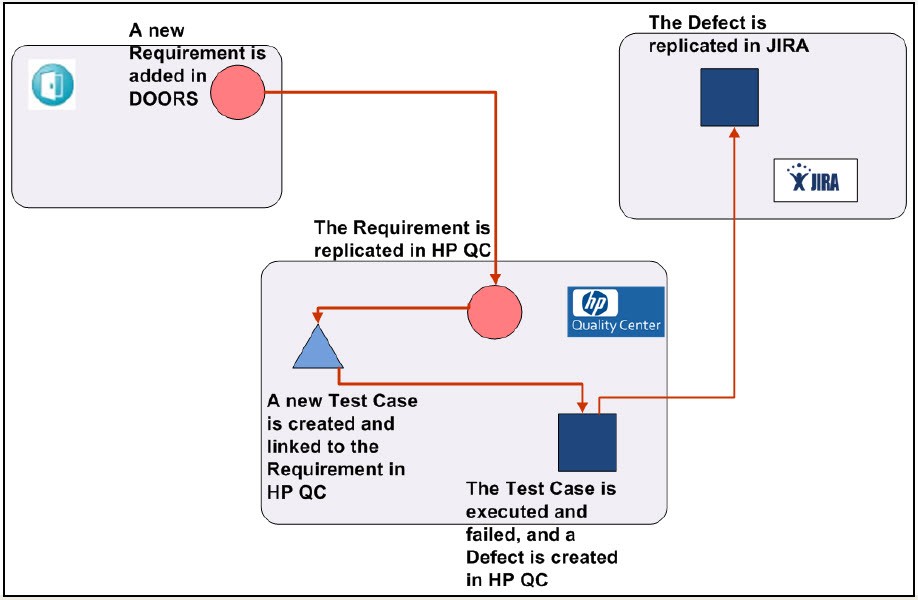
DOORS-HP Quality Center Integration
As shown in the example, you can integrate DOORS with HP QC so that Requirements in DOORS are replicated in HP QC. While creating a Test Case in HP QC, you can link it with the appropriate Requirement. Furthermore, you can execute a Test Case in HP QC, fail it, and create a Defect. The Defect is replicated in JIRA. This entire data flow is managed through Kovair Omnibus.
HP Quality Center (QC) is a widely used tool for managing Testing and Quality Assurance (QA) activities. It also helps you manage requirements, compile test plans, monitor testing activities, and track defects — a seemingly one-stop solution for all key SDLC steps.
However, HP QC is primarily meant to be used by Software Testers, and Developers are often more accustomed to other tools like JIRA and TFS. Encouraging the Developers to start using HP QC may not be a viable option.
Therefore, the best option is to integrate HP QC with other tools being used for managing application lifecycle, and Kovair helps you achieve this using ‘Kovair Omnibus QC Integration Adapter’.
Features & Benefits
- Bidirectional synchronization of exposed PLM components like PR, ECR, EN between Innovator and other ALM tools.
- Easy monitoring of exposed PLM components from other tool IDEs through Omnibus integrated platform.
Kovair Support for Quality Center Integration
Kovair Omnibus QC Integration Adapter lets you integrate HP QC with other tools in the integrated ALM system so that HP QC’s test management and requirement management capabilities are available to all the tools. When ALM tools like ClearQuest, Eclipse, JIRA, and TFS are integrated with HP QC, requirements, test cases, and defects from HP QC can flow bi-directionally between the integrated tools and can be managed from any of these tools. Kovair provides a vendor-neutral ALM platform called Kovair Omnibus Integration Platform to which you can connect your HP QC instance using Kovair Omnibus QC Integration Adapter. Kovair also provides adapters for connecting other ALM tools like CQ, JIRA, and TFS to Omnibus, as shown in the following figure:

HP QC Integration Adapter offers the followings:
Integrated Test Management
The increasing complexity of testing scenarios has raised the demand for an integrated, open, and flexible approach to support the management of overall test process. Kovair QC integration adapter enables you to manage the entire test life cycle through a centralized system in a heterogeneous environment. It provides bidirectional information and control over various tools from multiple vendors that make up the testing infrastructure. When HP QC is integrated with a third-party Requirement Management tool like DOORS through Kovair Omnibus Integration platform, requirements from DOORS can flow into HP QC. Since the requirements in both the tools are synchronized, changes in those requirements in DOORS are automatically updated in HP QC. Thus, the requirements based on which Testers write the test cases, are always accurate
Increased Productivity
Kovair QC Integration Adapter allows Developers and Testers to access the requisite artifacts from their preferred tool environment. Therefore, they do not have to learn new tools or log into different tools to access the requisite artifacts. This saves a lot of time and effort and improves productivity
Enhanced Collaboration
Kovair QC Integration Adapter enhances collaboration by providing a closed-loop process for Development and Testing teams. In the integrated environment, when a defect is added in HP QC corresponding to a process, that defect is automatically logged as an issue in JIRA and the issue is assigned to a Developer. Subsequently, the Developer receives an e-mail regarding the issue. When the developer marks the issue as ‘fixed’, the corresponding defect in HP QC is updated and the Tester gets informed. If the Tester verifies the fix and closes the defect, the corresponding issue in JIRA is also closed. Thus, appropriate team members are immediately informed when their action is required, and there is no communication gap. The team members also receive information about any change that impacts their activities. Since all the team members are well informed about the changes and their impacts, corrective actions are taken immediately.
Streamlined Development
In the integrated environment established by Kovair Omnibus, all the project artifacts including HP QC test cases and defects are replicated across tools. If Developers are using JIRA for managing defects and monitoring problem-fixes, they can view the defects recorded by Testers in HP QC from JIRA only. If Developers make any change in the status of a defect, the change is updated in the corresponding defect in HP QC.
Absolutely Traceability
Customers will accept your software only after they successfully complete User Acceptance Testing (UAT) and are fully convinced that the final product is in accordance with the requirements they specified and meets their business needs. The best way to ensure that UAT is successful is to provide absolute traceability between requirements, test cases, change requests, and issues recorded throughout the project. Absolute traceability can be achieved only when all project artifacts are linked to each other by direct or nested relations. When HP QC is integrated through the Kovair Omnibus, Developers can link change requests and defects to code files while Testers can link defects to test cases and requirements, thereby creating a complete chain of traceable artifacts.
Improved Software Quality
By integrating disparate ALM tools with HP QC and enhancing team collaboration, Kovair QC adapter helps eliminate software errors that occur due to manual processes and hand-offs, miscommunication, and inconsistent information.
Version Control and Baselines
HP QC has got capabilities of version control and baselining, which you can use to manage the requirements imported into HP QC from a heterogeneous tool by means of Kovair QC Integration Adapter.
On Demand Scenario

HP QC-JIRA Integration : As shown in the above example, you can integrate HP QC and JIRA so that test cases in HP QC are replicated in JIRA. Synchronization takes pace both ways in real-time for test cases and bug items. Therefore, while creating a bug in JIRA, you can link it with the appropriate test case. The bug, along with the linked test case is replicated in HP QC.
HP QC-JIRA-TFS-SharePoint IntegrationAs shown in the above example, you can integrate HP QC with SharePoint, TFS, and JIRA so that requirements in SharePoint are replicated and linked with: source code files in TFS, test cases in HP QC, and defects in JIRA. Also, test cases from HP QC and defects from JIRA can be replicated in SharePoint.
In today’s software industry, collaborative software development is the key to drive innovation, achieve profitable growth and increase efficiency. Collaboration is required because Software Delivery is spreading across departmental, geographic and corporate boundaries thereby leading to a proliferation of disparate tools, processes, and cloud usage.
Team Foundation Server (TFS) automates the Software Delivery process and enables you to manage the software development projects throughout the application lifecycle. It provides the commensurate communication and collaboration that you need to ensure that your software gets built fast and gets built right.
Features & Benefits
- Allows you to track code units corresponding to other artifacts, such as defects and change requests recorded in other integrated tools.
- Allows you to access specific versions or the latest version of code snippets in TFS from other development tools.
- Allows you to manage organization-wide macro processes cutting across various tools.
- Ensures cross-tool visibility, requirement traceability, and process automation.
- Helps you generate accurate cross-tool reports regarding project status with a single mouse click.
- Helps you get granular visibility of the valuable software assets that teams across your organization are building and maintaining from the tool of your choice.
- Bi-directional synchronization of TFS work items with other tools
- Outward publishing of SCM events occurring inside Team Foundation Server
- Consolidated data collection and reporting to aide project assessment
- Easy to configure and customize using web based codeless configuration screens
- Conflict detection and mediation
- Support for complex transformations
- Enables events in TFS to trigger workflows in other tools
Kovair Support for Team Foundation Server Integration
‘Kovair TFS Integration Adapter’ lets you integrate Team Foundation Server with a wide array of ALM tools like JIRA, QC, SVN, and Salesforce. By integrating TFS with coding and testing tools, software development teams can easily collaborate on projects regardless of whether they are located within the same department or geographically distributed.
Kovair provides a vendor-neutral ALM platform called Kovair Omnibus Integration Platform to which you can connect your TFS instance using Kovair TFS Integration Adapter. This allows the TFS work items to be visible from other best of breed tools being used by other teams and enables driving a consistent organization-wide process across all silos of software development. Kovair also provides adapters for connecting other ALM tools like HP QC, JIRA, and RRC to Omnibus, as shown in the following figure:

TFS Integration Adapter offers the followings:
Source Code Management
In software projects, source code files change over time; new files are created and old files are deleted. Typically, several developers work from different workstations on the same and/or different files. As a result keeping track of every change can become a tedious task.
A Source Code Management (SCM) system like TFS allows multiple developers to work on the same project/ project files at the same time.
When Team Foundation Server is integrated into the ALM system by means of Kovair TFS Integration Adapter, TFS events like check-in and check-out are propagated to other tools. Visibility is gained into specific files and file versions that are being worked upon for a particular requirement, change request or defect. Also, work items can move bi-directionally into development and testing tools. As a result, different stakeholders can get visibility into TFS changes without having to navigate away from their preferred tool environment.
Streamlined Development
In the integrated environment established by Kovair Omnibus, all the project artifacts including TFS work items can be optionally stored in a central repository that facilitates collaboration and reduces the wastage of efforts involved in transfer of information or software assets. This streamlines the development process and allows team members to deliver value rather than waste time in hand-offs between team members.
End-to-End Traceability
Traceability is desired in any software project to ensure that the final product can be tracked back to business goals and customer requirements. End to end traceability can be achieved only when all project artifacts are linked to each other by direct or nested relations. When TFS is integrated through Kovair Omnibus, developers can link requirements and issues from other tools to code files while testers can link issues to test cases and requirements thereby creating a complete chain of traceable artifacts.
Version Control
It is common to have multiple versions of the same software deployed at different sites. Often, bugs are present only in certain versions. Therefore, for the purpose of locating and fixing bugs, it is imperative to keep multiple versions of the software well within the reach of the developers. TFS integration addresses this requirement and allows developers to access specific versions or latest version of code snippets from their development tools.
Enhanced Collaboration
TFS itself is intended for collaborative software development. Kovair TFS Integration Adapter and Omnibus adds to the value of Team Foundation Server by bridging the gap between TFS and ALM tools that are not naturally compatible due to vendor issues or platform dependencies.
Data Collection and Reporting
TFS provides data collection and reporting features that aid in the assessment of a project’s health. Integration of TFS with other tools like JIRA and HP QC ensures that data about defects and test cases can also be utilized to generate reports and thereby provide improved visibility into the project.
Examples of TFS Integrations

TFS-JIRA Integration
As shown in the above example, you can integrate TFS and JIRA so that requirements in TFS are replicated in JIRA. While creating a bug in JIRA you can link it with the appropriate requirement. The bug, along with the linked requirement is replicated in TFS.TFS-JIRA-QC-SharePoint Integration
As shown in the above example, you can integrate TFS with SharePoint, QC, and JIRA so that requirements in SharePoint are replicated and linked with: source code files in TFS, test cases in QC, and defects in JIRA. Also, test cases from QC and defects from JIRA can be replicated in SharePoint.
JIRA, primarily an issue tracking tool by Atlassian is widely used by Developers and Testers for tracking defects, managing tasks, planning, sprints, managing agile projects and workflows.
Kovair Jira Adapter
The Kovair Omnibus Adapter for JIRA provides full scope collaboration between product management and development teams. When each team can use the tool, they are most comfortable with, greater efficiency and productivity results. Kovair Omnibus JIRA adapter supports the bidirectional flow of data between JIRA and other tools. It supports system and custom entities, attributes, and lookups of JIRA. The adapter supports the latest Jira Cloud as well as on-premise.
The integration with JIRA and other Product management tools provides real-time visibility into development progress for the required top-level requirements, moreover, product teams will be able to link all user stories, task and test cases associated with the top-level requirement. This ensures that all collaborators can see the same data in the ecosystem, irrespective of what application they use.
Features & Benefits
- Allows project teams to work on issues from within their preferred tool environment and thereby enhance their productivity.
- Automates actions on issues resulting from other integrated tools.
- Streamlines defect tracking and resolution processes spanning across multiple tools.
- Facilitates collaboration and keeps all stakeholders in sync with the latest changes and ensures smooth change propagation through lifecycle silos.
Why Integrate Jira with Kovair?
Enhanced Collaboration – Defect Management involves recognizing, reporting, investigating, and resolving defects by the same team. While identifying and reporting defects are the responsibilities of Testers, defect analysis, investigation, and resolution are the concerns of Developers. The integration provides undiluted data across the team. Bi-directional synchronization, aggregated comments, and inter-relationships ensure that all issues are up-to-date, consolidated and easily viewable for better decision making and service delivery.
Traceability – Kovair Omnibus’s central framework, in collaboration with Kovair JIRA Integration adapter, allows creation and management of traceability relationships between JIRA Issues and other artifacts from other tools. Maintaining traceability from requirements to defects reflects the stability of requirements and their implementation status.
Increase Team Productivity – Create/ Update Jira Items from connected tools and vice-versa without leaving the platform you use the most. Decrease unproductive context-switching, reduce manual jobs, remove complexity and thus improve productivity.
| Entities Exposed | Events Collected | Actions Supported | Relations Supported |
|---|---|---|---|
|
|
|
|
Use Case Example – Integration between Jira and Micro Focus ALM
Kovair Omnibus Jira integration along with Omnibus allows creation and management of business rules through a user-friendly Web interface — zero code deployment, for example, business rules can be defined so that a Bugs is automatically added in JIRA when a Test case is failed in Microfocus ALM. Moreover, Defect Management process can be defined so that when a defect is added in JIRA, it follows the workflow defined in the Defect Management process, without any manual intervention. However, when bugs are closed in Jira the status flows back Microfocus ALM. Therefore, two teams can work in two separate tools but will make decision seeing the same piece of data.
