Kovair is now part of SurgeONE.ai | Same experts, even more power.

Month: May 2014

Requirements are not the property of Business Analysts alone; in any of the software development methodology that we follow today, requirements are the focal point of the entire software delivery process. However, a diversified set of stakeholders and changes across the development lifecycle make it difficult to align the project deliverables with the correct requirements. IBM Doors Next Gen provides a solution to this problem with visually appealing, Web-based interfaces for requirements definition and management. In addition, the tool capitalizes on the IBM Rational Jazz platform and facilitates collaborative, fast-paced development using any of the methodologies like iterative, waterfall, and agile.

Doors Next Gen allows integration with other ALM tools through OSLC linking. However, linked data based OSLC integration does not effectively address use cases that demand synchronization of artifacts across Doors Next Gen and best of breed tools from other vendors.

KOVAIR IBM DOORS NEXT GEN INTEGRATION ADAPTER

Kovair IBM Doors Next Gen Integration adapter provides integration of IBM Doors Next Gen with other ALM tools by leveraging the Omnibus ESB architecture to enable collaboration among the customers, stakeholders, and project team members irrespective of their tools and locations.

The integration of Doors Next Gen with other ALM tools offered by Kovair is not a point- to-point integration. Instead, it is based on the Enterprise Service Bus (ESB) architecture that requires only one adapter per tool, thereby making the integration environment readily scalable. It instantly allows Doors Next Gen to get integrated with all the other tools integrated to Omnibus.

Also, unlike OSLC integration that links objects of Jazz based products, the integration of Doors Next Gen with other ALM tools using Kovair adapter facilitates entity and field mappings and ensures full data flow across tools.

Features & Benefits

  • Allows the stakeholders to get the requirements right throughout the software delivery chain.
  • Keeps all stakeholders in sync with the latest changes and ensures smooth change propagation through lifecycle silos.
  • Enables Web-based review of requirements and collaboration through real-time comments integration.
  • Integrates Doors Next Gen with tools from multiple functional areas and vendors to support lifecycle traceability and impact analysis.
  • Allows Project Managers to visualize and analyze requirements from their Project Management tools itself before allocating resources, thereby improving productivity and reducing costs.
  • Provides a centralized platform for requirements elicitation, analysis, organization, and management.
  • Kovair adapter for IBM Doors Next Gen enables requirements in Doors Next Gen to flow bi-directionally between IBM Doors Next Gen and other integrated ALM tools thereby facilitating effective change management.
  • Requirement Management throughout the development lifecycle.
  • Robust, reliable, and readily scalable enterprise-class architecture.
  • Bi-directional synchronization of RequisitePro requirements with other tools from other vendors/platforms.
  • Ability to define customized business rules and establish relations between objects of disparate ALM tools.
  • Easy to configure and customize using web- based, codeless configuration screens.
  • Conflict detection and mediation.
  • Web interface for end-to-end traceability, consolidated reporting, and dashboard.

Why Integrate Doors Next Gen with Kovair

  • Change Management and Traceability: As the customer and project team keep getting better understanding of the system needs and constraints, the project requirements get changed continuously throughout the SDLC. It is imperative that to ensure successful project delivery, the requirement changes are propagated to the stakeholders effortlessly and in real time. Kovair Omnibus’s central framework, in collaboration with Kovair Doors Next Gen adapter, allows creation and management of traceability relationships between requirements in Doors Next Gen and other tools.
  • Tools Integration: Kovair Omnibus Integration Platform can integrate tools irrespective of their vendors and platforms. Kovair’s SOA based technology makes it very convenient to integrate any tool on the fly. Just like Doors Next Gen adapter, Kovair provides adapters for several other ALM tools that can be hooked to the Omnibus platform.
  • Comments and Relationships: When tools are integrated through the Kovair Omnibus Integration Platform, comments and relationships between artifacts can also flow across the integrated tools. This feature enables the stakeholders to review requirements from their preferred tools and sync the comments with the requirements in Doors Next Gen.
  • Flexible Configuration: Kovair Omnibus integration allows codeless configuration and management of business rules through user-friendly Web interface, independent of the individual tool adapters – no hard- coded logic is involved.
  • Requirements Management: During the course of Requirement Lifecycle, requirements may start as just cryptic notes from client interactions or rough documents from customers. The brainstorming or analysis of these requirements often involves text, pictures, process diagrams, use cases, and story boards, which must eventually become part of the workable requirements that drive the design, development and test activities. Doors Next Gen provides textual and visual techniques to elicit, elaborate, and validate requirements with stakeholders over the Web you can replicate them in other integrated tools, such as Quality Center, JIRA, TFS, and RequisitePro and link with the native artifacts of these tools. For example, you can create Work Items in TFS corresponding to the requirements derived from Doors Next Gen. Furthermore, you can link these work items to the code files that are being checked into TFS to get traceability from Requirements to code files in TFS. In addition, you can create and replicate custom artifacts and custom fields to aid your development activities. Kovair Doors Next Gen adapter-based integration custom fields to aid your development activities. Kovair adapter-based integration works bi-directionally and can help synchronize disparate tools from different silos. Synchronization of requirements across tools ensures that they are always up-to-date and are being accessed by the appropriate stakeholders in their own tool environment.
  • Collaborative Development: Conventional Requirements Management tools enable Analysts in detailing the requirements and managing changes effectively. However, since requirements are not proprietary information that can be accessed by Analysts alone, it is beneficial to have the requirements integrated into the tools used by different stakeholders. Through Doors Next Gen adapter, other stakeholders can get information regarding the requirements detailed in Doors Next Gen.

Example Scenario: IBM Doors Next Gen integration with Microsoft TFS using Kovair Omnibus Integration Platform

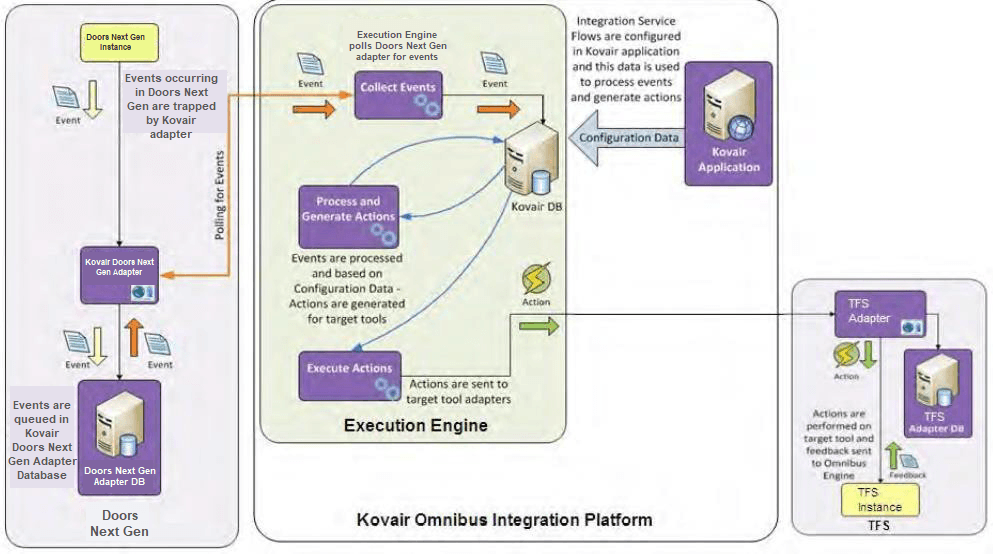
Doors Next Gen integration with TFS using Kovair Omnibus Integration

The Doors Next Gen adapter, developed using JAZZ APIs, provides the mechanism to collect events generated in the Doors Next Gen and perform actions on the Doors Next Gen requirements. The events collected by the Doors Next Gen adapter are sent to the Execution Engine of Kovair Omnibus Integration Platform. At the other end of the Kovair Omnibus Integration Platform are other best-of-breed ALM tools, such as Microsoft TFS and HP QC, which are connected using their respective adapters/connectors developed by Kovair.

The Execution Engine is responsible for retrieving the event messages collected by the Doors Next Gen adapter, processing those event messages according to user-configured integration flows, and sending action messages to the other integrated tools through their respective adapters. The reverse can also be achieved by preforming actions inside Doors Next Gen triggered by events occurring in other tools.

‘Kovair GitHub Adapter’ integrates GitHub Enterprise with other best-of-breed ALM tools and helps stakeholders remain up-to-date with latest file versions.

GitHub.com is an enterprise cloud based hosting service, on which one can publish Git repositories and collaborate with people from distributed geographical locations. GitHub Enterprise is the on-premise version of GitHub.com. Kovair integration supports both GitHub.com and GitHub Enterprise. The integration extracts information from GitHub into connected software applications through its adapter called ‘Kovair GitHub Adapter’. It allows the users to collaborate and comment during code review sessions, track changes that have been made, log issues and plan future projects.

Features & Benefits

  • Enables data synchronization between GitHub and Kovair ALM tools that are connected to the Omnibus integration platform.
  • View GitHub Commit Graph directly in the ALM platform.
  • Allows you to track code units corresponding to other artifacts, such as issues and change requests recorded in other integrated tools.
  • Provides forward and backward traceability of Repository, Branches, Commits, Files, File Versions and Issues with all related artifacts of other ALM tools.
  • The integration is focused on empowering the developer tools ecosystem. The adapter also provides a simple framework in which one can engage with developer tools companies who are building software on top of GitHub.
  • Integration with both Cloud based and On-Premise tools.
  • Zero-error synchronization through built-in reliability mechanisms.
  • Easy maintenance of structured eventaction based integration rules.
  • Support for transformation of data through formula expression builders.
  • End-to-end traceability across the artifacts and impact analysis.
  • Easy configuration through web based codeless configuration screens.

Kovair GitHub Integration Adapter

Kovair Omnibus Integration Platform supports both synchronization and federation of data. The users can use this functionality to expose the federated link for each of the file versions and file version histories that are being created by developers and uploaded into a GitHub repository. The users can view the details of the file and the actual code through the exposed federated link from within their own tools environment, that are connected to the same Omnibus Platform through their corresponding integration adapters.

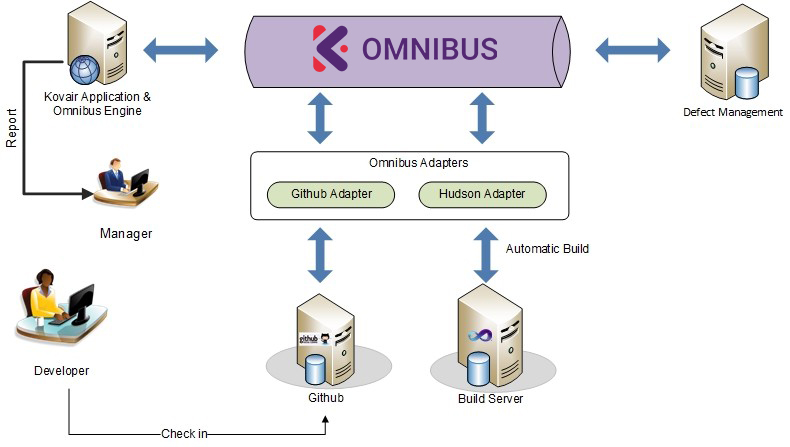
GitHub Adapter Architecture Diagram
Fig: Architecture Diagram

Why Integrate GitHub With Kovair

Version Control

Kovair GitHub Adapter enables propagation of GitHub events to the other connected tools. Visibility is gained into specific files and file versions with respect to Requirement, Change Request or Issue. Hence, ALM users can view GitHub changes right from their preferred tool environment.

End-to-End Traceability

The integration of GitHub with other connected ALM tools ensures that any changes made to any of the files can be traced to identify the originating cause, whether it is a fix for a defect or an enhancement request.

Issue Management

Integration also provides access to the change information and associates the changes to the corresponding Issues being raised either in GitHub or in another connected Defect tracking tool.

Commit Graph

Compressive summary of yearly commits.

GitHub Integration Use Case

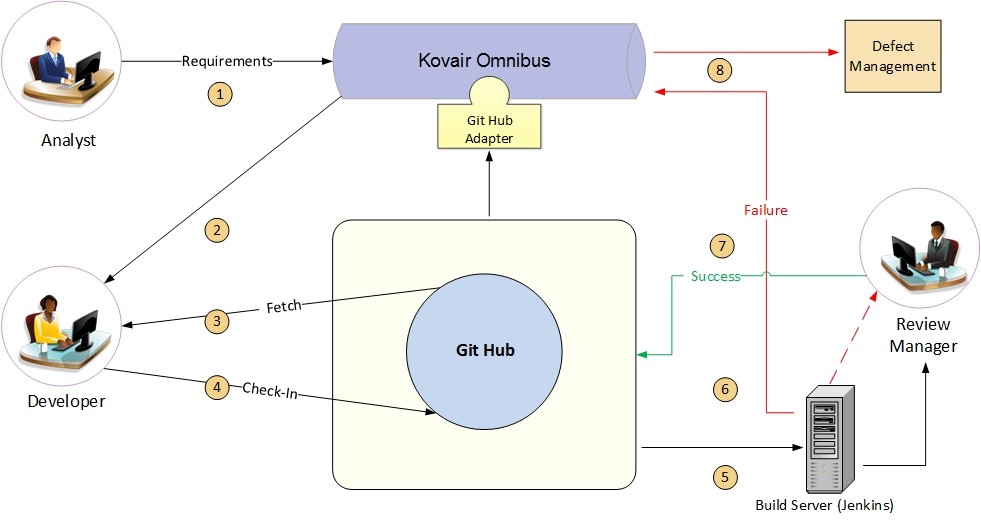
Using the Kovair GitHub Adapter, the users can view the difference between various file versions. The users also get a complete traceability between commits, files, file version and issues on each check-in. The integration goes a step ahead facilitating the development team to view file directly from GitHub in Kovair. The submitted defects are passed through automated workflows for analysis and validation. Through the integration users can also get a descriptive, human-readable error message for any failed build, so that one can easily troubleshoot what went wrong. This allows the manager to get the updates from Kovair Dashboard and act upon it. Managers can also see commit related graphs (generated in GitHub) in Kovair.

GitHub Adapter Architecture Diagram
Fig: GitHub Adapter Architecture Diagram

As shown in the architecture diagram below, through Kovair Omnibus integration with GitHub, one can have continuous build automation, defect tracking and consolidated reporting. Visibility is gained into specific files and file versions with respect to Requirement, Change Request or Defect. Hence, ALM users can view GitHub changes right from their preferred tool environment.