Kovair is now part of SurgeONE.ai | Same experts, even more power.

Month: July 2019

Jenkins Blue Ocean is plug-in over Jenkins to provide a better a user experience. It rethinks the user experience of Jenkins, modelling and presenting the process of software delivery by surfacing information that’s important to development teams with as few clicks as possible

Kovair Jenkins Blue Ocean Adapter

The ‘Kovair Jenkins Blue Ocean Integration Adapter’ allows rich data from Jenkins to be monitored and captured to Kovair Omnibus Integration Platform and thereby synchronize with other ALM tools in the system. The primary objective of the integration is to complete pipe line view dynamically from Jenkins. The pipeline view also displays the detail execution status. Moreover, Kovair Adapter allows execution of Pipeline externally.

Features & Benefits

  • Monitor and track Build and Jobs from Jenkins into Kovair ALM
  • Provides complete visibility to view the status of Jenkins Builds and Pipeline Jobs from Kovair ALM or other integrated tools that are connected through Omnibus.
  • Direct navigation to Jenkins Blue Ocean Interface from Kovair ALM to give the end users a complete 360-degree view.
  • Direct Accessibility to view Jenkins Pipeline Jobs and Builds from other integrated tools.
Integrate Jenkins with Kovair

The integration framework contains two components – an adapter and a plug-in.

  • Single Interface for pipeline: It is a Service that exposes Jenkins jobs and pipeline related information to Kovair central repository. It also acts as a trigger to fire a Build/ Job/ Pipeline in Jenkins from Kovair Application.
  • Pipeline data: Kovair adapter for Blue Ocean visualizes Pipelines at Kovair platform along with the steps and logs to allow simplified comprehension of the continuous delivery pipeline – from the simple to the most sophisticated scenarios.

Kovair Jenkins Blue Ocean Adapter

Entities Exposed Events Collected Relations Supported
  • Job
  • Build
  • Job Modified
  • Build Completed
  • Build to Job Added
  • Build to Job

Why Integrate Jenkins Blue Ocean Adapter with Kovair?

End-to-End Traceability: Integrating Jenkins tool and Kovair application with Kovair adapter for Jenkins Blue Ocean opens access to the pipeline view from the Kovair application from where users can get update of the Pipeline Job and Build status.

Kovair Intelligent DevOps is an enterprise solution simplifying and automating execution and monitoring real time metrics. This is achieved with seamless integration of the best of the breed tools in development, build, test and deployment cycles to enable a one clicks execution. With the integration with Blue Ocean the solution reaches a new height.


Note: The adapter as developed and offered by Kovair follows the subject tool’s standard specifications. Any deviations from the Tool’s typical use pattern may not have been anticipated in our off-the-shelf product. For any customization or special configuration needs, please contact Kovair Sales – sales@kovair.com
Salesforce is a cloud-based CRM solution from Salesforce.com that brings companies and their present and potential customers on a same integrated platform. This integration results into better systematized information and enhanced data exchange. Since CRM is indispensable for any organization, getting Salesforce integrated with various tools involved in the process chain can help companies stay connected to customers, restructure processes and improve cost-effectiveness. Customers can also power their businesses by building and maintaining their customized business applications on force.com, a platform offered by Salesforce.

Kovair Salesforce Integration Adapter

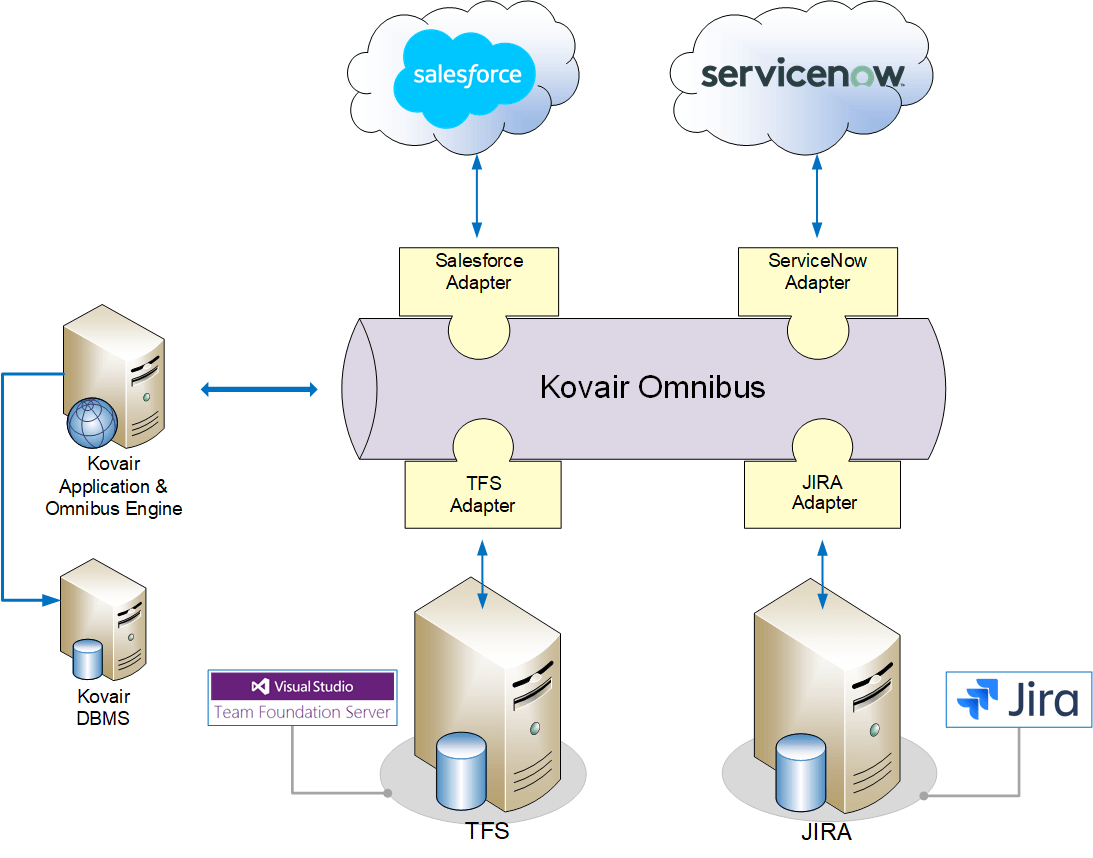
The Kovair Salesforce adapter is REST based integration, when integrated to the Salesforce application (also custom applications) using Kovair Omnibus integration platform, allows users to connect their Salesforce application to various other on-premise or cloud-based applications like HelpDesk and Issue Management applications (JIRA, TFS, Remedy, ServiceNow). When it is connected to these applications/tools, Salesforce entities like Account, Cases and Tickets becomes accessible to these applications in real time. Salesforce Integration adapter depends on REST API for exposing metadata for mapping. Dataflow is bi-directional, so the updates are synchronized to Salesforce instantaneously. This integration between Salesforce and other tools is achieved with the help of Kovair Omnibus platform and various tool-specific adapters in the eco-system.

Features & Benefits

  • Supports processing of tickets and cases raised in Salesforce through automated workflows via Omnibus platform in other integrated tools like JIRA, TFS, Remedy, and others.
  • Supports direct event-based actions like Add, Delete and Edit for all entities through Omnibus.
  • Establishes bi-directional synchronization between Salesforce and the other integrated tools.
  • Confirms bi-directional synchronization of Salesforce entities like Cases and Tickets with entities in other integrated tools.
  • Assists Support Team for enhanced customer service.
  • Integration with HelpDesk and Issue Management applications enhances communication across teams.

Benefits of Kovair Salesforce Integration Adapter

  • Improved Collaboration: Integration of Salesforce with HelpDesk and ITSM tools like JIRA, TFS, ServiceNow, with the help of Kovair Salesforce Integration adapter leads to greater collaboration between the Software Development team and Customer Support team. The dedicated Customer Support team can swiftly submit issues or flaws raised by the customers with the Development team and can keep the customers informed about the resolution status of these issues.
  • Advantage Cloud: Kovair Salesforce Integration adapter aids in integrating Salesforce applications with the other cloud-based tools existing in their network.
  • Enhanced Customer Satisfaction:  This integration can help the Development team to prioritize and resolve defects as per customers’ status and requirements. The Support personnel can keep the customers up to date about their ticket status and accelerate the issue resolution procedure. This kind of service is enormously appreciated by the existing customers and help win over new business.
  • Traceability & Visibility – Salesforce users have broad visibility into customer cases and tickets because of Salesforce integration with the Issue Tracking tools like JIRA. These tools are in turn linked to other development tools via Kovair Omnibus platform. Issues can be traced back to the customers in Salesforce applications and then fixed using Development tools available within the eco system.
Salesforce with JIRA TFS ServiceNow

Fig: Integrating Salesforce with tools like JIRA, TFS, ServiceNow through Kovair Omnibus

Services Supported in Kovair Salesforce Adapter

Exposed EntitiesSupported EventsSupported ActionsRelationships
  • All the system defined as well as custom entities are supported.
  • Supports basic events like Add, Edit and Delete for all entities.
  • Supports basic actions like Add, Edit and Delete for all entities.
  • Relations are exposed by Entity Object fields.

Use Case Scenario with Salesforce Integration

Use Case Scenario with Salesforce Integration

Salesforce-JIRA Integration As shown in the above example, you can integrate the cloud-based application Salesforce with on-premise application (JIRA) so that Tickets in Salesforce are replicated as Issues in JIRA and then passed through automated workflow for Issue Analysis and Resolution. Accordingly, the status and priority of the Issue is updated in JIRA. All the modifications to the Issue in JIRA are replicated in the corresponding Ticket in Salesforce.


Note: The adapter as developed and offered by Kovair follows the subject tool’s standard specifications. Any deviations from the Tool’s typical use pattern may not have been anticipated in our off-the-shelf product. For any customization or special configuration needs, please contact Kovair Sales – sales@kovair.com

Integration Adapters/Connectors and Plug-InsKovair offers over 110+ off-the-shelf multi-vendor ALM and IT tool adapters and plugins for integration support. These adapters and plugins can help to extend the integrated development environment that is created by integrating different ALM tools to Omnibus. Using Omnibus and respective tool API, Kovair adapters can expose all major artifacts and related attributes of one tool to other tools facilitating an end-to-end traceability across the product lifecycle. Users can also fetch data, pass events, and perform actions on other tools through these adapters. Kovair plugins facilitate complete IDE management by allowing users to add, view, and edit artifacts in other connected tools directly from the IDE.


New Relic’s software analytics product for application performance monitoring (APM) delivers real-time and trending data about your web application’s performance. With end-to-end transaction tracing and a variety of color-coded charts and reports, APM tool New Relic can visualize data down to the deepest code levels.

Kovair New Relic Integration Adapter

Kovair New Relic Adapter’ allows one to integrate New Relic tool with best-of-breed 110+ tools in Omnibus ecosystem. As a result of the integration, data from New Relic can be traced and analyzed in Kovair or any analysis tool.  This integration brings Kovair DevOps solution to capture application performance data to the central repository.

Features & Benefits

  • Synchronize attributes related to Application, Application Instance, and Application Host from Relic to target tools.
  • Provides complete visibility of application performance from a single interface.
  • Real-time metrics based on business events, transaction health across different platforms, response error, etc.

Why Integrate New Relic With Kovair

  • Traceability: Relations between Application to Application Host and Application to Application Instance created in New Relic tool will also get synchronized with other tools in the integrated scenario. Using Kovair Omnibus platform, complete traceability from Application to Application Host and Application to Application Instance can be tracked through a single interface.
  • Key Role in CI/CD: The New Relic tool, when integrated with Kovair Omnibus Integration using Kovair Relic adapter, enables CI/CD Performance Monitoring from a single application dashboard. Different teams working in a project and using different tools can closely track how code deployments affect the performance of application performance, analyze issues affecting database and instance-level performance, as well as all entity-related relationship directly from the Kovair workspace without having to individually log into the Relic tool. 
  • Application Performance Metrics: Generate metrics based on Business Events such as sign ups or purchase confirmation, Web Transaction Time and Browser Transaction Time, Event Analytics, Event Errors, Event Violations, Application Server Requests and Response Time, Page Views, etc.

Services Supported in Kovair Azure DevOps Adapter

Exposed Entities Supported Events Exposed Relations
  • Applications
  • Application Instances
  • Application Hosts
  • Supports basic events like Add and Edit for all entities.
  • Applications to Application Instances.
  • Applications to Application Hosts.

Use Case Scenarios with Kovair New Relic

New Relic monitors your application and infrastructure thus providing infrastructure’s health statistics and other information on your deployment such as Low overhead for your users and real-time information.

Regardless of where you are in your DevOps journey—whether you’re just getting started, have seen success in small pilots, or are already fully committed to the DevOps approach— Kovair New Relic adapter integrations can help collect monitored data and provide an overall view of the performance.

A transition to DevOps is not complete without a robust understanding of dependencies across application teams and related services. Visibility into critical dependencies improves collaboration across teams, reduces outages, and improves performance; thereby maintaining consistency throughout your application performance.

With the integration in place, New Relic provides the data you need to measure and monitor the new features that the Dev team delivers, while ensuring stability in quality that the Ops team oversees. As a DevOps driven company itself, New Relic understands the specific challenges software teams are facing and have built specific features with agile app delivery in mind.


Use Case Scenarios with Kovair Azure DevOps

You may have complex environments with service-orientated architectures like Kovair Omnibus, where one bottleneck can affect multiple applications and transactions. Cross Application Tracing makes it easy for DevOps– focused teams to get to the root cause of a problem and get it in front of the right person quickly.


Note: The adapter as developed and offered by Kovair follows the subject tool’s standard specifications. Any deviations from the Tool’s typical use pattern may not have been anticipated in our off-the-shelf product. For any customization or special configuration needs, please contact Kovair Sales – sales@kovair.com

Microsoft Azure DevOps provides a collaboration platform for application lifecycle management solutions. It is used by Development and QA teams, collaborating with the Microsoft development ecosystems.

Life cycle Teams can work both on cloud and on-premise using Azure DevOps Services and Azure DevOps Server respectively. Azure DevOps supports Release Management, Task Management, Test Case Management and Agile Planning and Collaboration.

Kovair provides a vendor-neutral integration platform called Kovair Omnibus Integration Platform, on which the best-of-breed tools can be integrated.

Kovair Azure DevOps Adapter

Kovair Omnibus Adapter for Microsoft Azure DevOps connects Microsoft Azure DevOps with Kovair ALM or other tools in the ecosystem by enabling bi-directional synchronization of work items. The adapter provides integration which allows disparate teams to collaborate without having to leave their respective work environments. The adapter is designed to work with both cloud (Azure DevOps – formerly VSTS) solutions as well as local (Azure DevOps Server – formerly TFS). Kovair Omnibus, along with the Azure DevOps adapter, allows bi-directional synchronization of any work items like requirements, user stories, tasks, defects and tests. This ensures that all collaborators can see the same data in the ecosystem, irrespective of what application they use.

Features & Benefits

  • Supports bidirectional synchronization of work Items and associated relations between the connected tools.
  • Trace and view the file directly from SCM, using federated files from connected tools.
  • Real-time metrics from cross-tool data that can be used to generate reports and dashboards.

Why Integrate Azure DevOps with Kovair?

  • Traceability: The key advantage of Kovair Omnibus Azure DevOps adapter is end-to-end traceability. Work item types are synchronized together with their inter-relationships. All attributes of the work items can be synchronized, including links and attachments. This provides comprehensive traceability of the artefacts, while the respective teams can keep working in their respective environment.
  • Track Check-in Files: The adapter also supports tracking and capturing files, being checked in Azure DevOps. The adapter publishes File, Changeset and Pull Request information.
  • Reports and Dashboards: Kovair ALM platform has a powerful reporting engine. Based on the incoming data from Azure DevOps, users can generate different types of reports and dashboards.

Services Supported in Kovair Azure DevOps Adapter

Exposed Entities Supported Events Supported Actions Exposed Relations
  • Bug
  • Epic
  • Feature
  • Issue
  • Task
  • Test Case
  • User Story
  • Custom Entity
  • Build
  • Build Definition
  • Release
  • Release
  • Definition
  • Test Plan
  • Test Run
  • Shared Steps
  • Steps
  • Commit
  • File
  • Pull Request
  • Supports basic events like Add for all entities except Shared Steps, Step, Test Run,Build, Build Definition, Release, Release Definition and commit.
  • Supports basic events like Edit for all entities.
  • Supports basic events like Delete for all entities except for Step, Commit and Pull Request.
  • Bug
  • Epic
  • Feature
  • Issue
  • Task
  • Test Case
  • User Story
  • Custom Entity
  • Test Plan
  • Shared Steps
  • Step
  • Test Run
  • Bug/Epic/Feature/User Story/Issue/Task/Test Case/Custom Entity
  • With Many to Many
  • Test Case to Test Plan
  • Test Run to Bug
  • Work Item entities (Bug/Epic/Feature/User Story/Issue/Task/Test Case/Custom Entity) to Commit

Use Case Example of Kovair Omnibus Integration with Azure DevOps

Let us consider a typical use case scenario where the Microsoft Azure DevOps tool is integrated with Atlassian JIRA tool and Kovair ALM, using Kovair adapter for Azure DevOps and Kovair Omnibus platform.

  • Flow 1: JIRA as the source tool and Azure DevOps as the target tool
    When a story is added in the JIRA tool, it gets automatically added to the Azure DevOps tool and Kovair ALM.
  • Flow 2: Azure DevOps as the Source tool and JIRA as the target tool
    When a bug is created and linked to the user story in Azure DevOps, it gets automatically synced with the JIRA tool and Kovair ALM. Similarly, the relation established between the Bug and the Story in Azure DevOps will also get automatically synced with the JIRA tool.
  • Flow 3: JIRA as the source tool and Azure DevOps as the target tool
    If the status of the bug is updated as Done in the JIRA tool, then the modification will automatically reflect in Azure DevOps and Kovair ALM.
  • Use Case Scenarios with Kovair Azure DevOps

      Note: The adapter as developed and offered by Kovair follows the subject tool’s standard specifications. Any deviations from the Tool’s typical use pattern may not have been anticipated in our off-the-shelf product. For any customization or special configuration needs, please contact Kovair Sales – sales@kovair.com

    HELIX ALM Integration Adapter helps the Helix ALM tool to take care of the development process of applications and track traceability of Requirements, Requirement document, Test case, Defects, Test run, and Folder entities. 

    Using HELIX ALM Soap based SDK, end users can use the Kovair Helix adapter to connect and directly re-route the newly added or updated records from various vendor management tools to Helix ALM and vice- versa.

    Kovair Omnibus works as the central platform of data flow and exchange between all ALM tools. When integrated with the adapter, it can expand the benefits of Continuous Monitoring and Traceability by automating the flow of software change requests and test monitoring newly deployed codes to hasten the release process of the software.

    Key Highlights of Kovair-Helix Adapter

    Kovair-Helix Adapter when integrated with Omnibus platform offers the following benefits –

    Universal Language of Communication between Tools

    Kovair-Helix Adapter enables the Helix tool to communicate with other ALM tools using the standard HELIX ALM Soap based SDK.

    Support for Helix Folder Hierarchy

    Kovair Helix ALM Adapters support complete folder hierarchy along with the data inside. The integration enables a bi-directional hierarchy folder data flow. Helix data can be integrated with Kovair Platform to offer visual and data traceability features.

    End-to-End Data Traceability

    The adapter can expose entities and the data related to entities like Defects, Requirements, Test cases, Test run directly from the Helix to Kovair Omnibus. As a result of the integration, data can be made visible from other ALM tools that are integrated to the Kovair platform. In addition, a transferred data can be used for creating progress report graphs.

    Features & Benefits

    • Synchronizes Helix ALM tool with Requirement management, Test management, and Defect management tools to keep track of every process during development lifecycle.
    • Real-time updates on the status of any Helix work item, its estimated time of delivery, for identifying release impediments and risks.
    • Track delivery timelines seamlessly with concurrent updates on any Helix work item changes.
    • Collaboration between teams and departments with HELIX ALM adapter with cross tool integrated reporting features.
    • Tracking Requirement, Test Cases, Test Result, Application Defects, and their interrelationship including relevant fields like the ID, Title, Status, etc. 
    • With Helix ALM adapter, you can automate traceability across all work items and data — from requirements capture and risk analysis through testing and defect resolution.
    • Web based codeless configuration screens for easy configuration and customization.

    KOVAIR Helix ALM INTEGRATION ADAPTER

    Better Delivery

    Integrating Helix ALM and JIRA using Omnibus enables better delivery. When the two tools collaborate seamlessly, the overall collaboration in the ecosystem increases and enterprises deliver better quality products to customers at a faster pace.

    Services Supported

    Exposed Entities Events Collected Actions Supported Relations Supported
    • Defect
    • Requirement
    • Requirement Document
    • Test Run
    • Test Case
    • Folder
    • Supports basic events like Add and Edit.
    • Supports actions Add, Modify and Delete.
    • Defect To Requirement
    • Defect To Defect
    • Defect To Requirement Document
    • Defect To Test Run
    • Defect To Test Case
    • Requirement To Requirement
    • Requirement-To-Requirement Document.
    • Requirement To Test Run
    • Requirement To Test Case
    • Requirement Document To Requirement Document
    • Requirement Document To Test Run
    • Requirement Document To Test Case
    • Test Run To Test Run
    • Test Case To Test Run
    • Test Case To Test Case
    • Folder To all the entities mentioned above

    Helix ALM Integration Bugzilla

    By Integrating Helix ALM and Bugzilla, development teams will enjoy better visibility into the Test Cases, the Test Results, as well as the overall quality. Moreover, it offers managers detailed context of the requirements as well as any change/enhancement related to it. When the two teams collaborate seamlessly, the overall collaboration in the ecosystem increases. Enterprises also deliver better quality products to customers at a faster pace.

    Upon completion of a work on Requirements, the engineering team can change the status to ‘complete’ that will indicate the quality control team to proceed with running the test cases against the user stories.

    Bi-directional flow of data will include updates on the status of a story, its estimated time of delivery, and any risks that might delay the impending release.

    Helix ALM Integration

    Kovair Azure Integration Adapter helps the Azure tool to take care of the deployment process after the developer checks in a code file to the Source Control Repository.

    Using XML programming language, developers can use the adapter to directly re-route the checked-in code file from the SCM and then deploy it in Azure tool.

    Kovair Omnibus works as the central platform of data flow and exchange between all ALM tools. When integrated with the adapter, it can expand the benefits of Continuous Deployment and Delivery (CD) by automating the flow of software build files to the deployment tool thereby hastening the release process of the software.

    Key Highlights of Kovair-Azure Adapter

    • Universal Language of Communication between Tools
      Kovair-Azure Adapter enables the Azure tool to communicate with other ALM tools using the standard XML programming language.
    • Centralized Data View of Azure Reports
      Users can stream data reports from multiple Azure instances and view it from Kovair Platform. Such as line graph reports of ‘Http Error Requests’ of websites hosted in Azure for last 24 hours, ‘Average Response Time vs. CPU Time’ of a Web App Service created in Azure, ‘Inbound vs Outbound’ data of a Web App deployed in Azure for the last 24 hours.
    • End-to-End Data Traceability
      The adapter can expose entities and the data related to these entities directly from the tool to Kovair Omnibus. As a result of the integration, data can be visible from other ALM tools that are integrated to the Kovair platform. In addition, it could also be used for creating progress report graphs.
    • Direct Deployment Actions
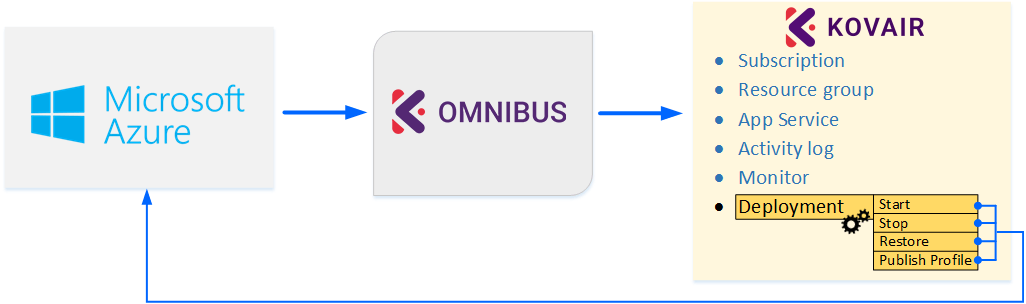
      The adapter enables users to take command of any deployment action like Start/Stop/Restart/Publish, directly through Omnibus.

    Features & Benefits

    • Synchronizes Azure tool with testing and defect management tools to automate testing of deployed build files through provisions.
    • Supports the best practices of software delivery like streamlining resource allocation to achieve Continuous Integration, Continuous Testing, and Continuous Delivery.
    • Enables users to take command of deployment actions in Azure like Start/Stop/Restart.
    • Enables one to track Application Deployment Result, Component Deployment Result, and their interrelationship including relevant fields like the Request ID, Deployment Status.
    • Ensures direct tracking and monitoring of deployed objects in Azure from Omnibus and other ALM tools.  
    • Enables Release Managers to view status of deployed applications from Kovair Omnibus or other ALM tools that are connected to it.
    • Caters to the Azure deployment setup containing other existing builds.
    • Web based codeless configuration screens for easy configuration and customization.
    • Unidirectional synchronization of released deployments with corresponding segments, tasks, and their mutual relationship. 
    • ESB based integration with SCM tools that offers direct access to Deployment information and Release configurations in Azure from respective tool IDEs.
    • End-to-end traceability of the Deployment process and the tasks corresponding to it.
    • Push button deployment process that removes manual effort and recovers the wasted resource time.

    Benefits of Kovair Dynatrace Adapter

    • Track Alert:  With the integration in-place using Omnibus IT team can centrally track and manage alerts & notifications on application health and critical business transactions based on the rules defined for threshold.
    • Code level Diagnostics:  As part of performance testing, it provides ability to determine which transaction is slow, and helps us in identifying the reasons for slow transaction by allowing to drill down to the method in code causing issue and helps in isolating the performance bottlenecks.  All the critical transactional can be traced intimated to the respective team.

    Services Supported in Kovair Dynatrace Adapter

    Exposed Entities Events Collected Actions Supported Relations Supported
    • Subscription
    • Resource Group
    • App Service
    • Activity Log
    • Monitor
    • Deployment
    • Supports basic events like Add and Edit.
    Supports actions like Start, Stop, Restart, Publish, and Deploy.
    • Subscription ID to Resource Group
    • Subscription ID to App Service
    • Resource Group to App Service
    • Subscription ID to Activity Log
    • Subscription ID to Resource Group to Activity Log
    • App Service to Monitor to Activity Log
    • Deployment to Activity Log
    • Change of Status/ Addition of New Event to Activity Log

    Azure Integration Usecase

    Kovair-Azure Continuous Deployment begins once the code files are fetched from the version control repository hosting service (example – GitHub) to facilitate the technical aspects of continuous delivery.

    To understand the Kovair Azure deployment process, let us consider a scenario wherein a requirement is created by logging into a Requirement Management (example – IBM RRC) tool. When the tool is integrated with the Omnibus Enterprise Service Bus, all the logged in requirements will become traceable from Kovair platform as well as from other ALM tools that are connected to it. Similarly, based on these requirements when a build is triggered, all the corresponding Applications, Components, and Deployment processes that are configured in Azure, will automatically become traceable when the Azure adapter is used to integrate the tool with Kovair platform.

    Azure Integration Usecase

    Users of Kovair can directly fetch the artifacts from the control repository (example – GitHub), trigger a build using a build tool (example – Jenkins), test the build file using testing tool (example – Selenium), and Start/ Stop/ Restore/ Publish to deploy it on to the staging and production server using the Azure tool. During the process of deployment, all data related to the individual deployed components, their completion and status would become directly traceable from Kovair platform. In case of any unsuccessful deployment, that is, if a particular build component fails to pass the Selenium test, Kovair’s Traceability View can easily point out the incorrect version of the deployed code and quickly modify it with a correct version. When the deployment process is successfully complete, a deployment success notification will be automatically updated inside Kovair Omnibus. This notification will also be visible from inside the Selenium tool, following which, the QA team can execute regression tests based on previously created test cases. Kovair-Azure integration offers complete managerial traceability across the whole deployment process. It minimizes the manual task and reduces the frequency of errors in an otherwise repetitive process.


    Note: The adapter as developed and offered by Kovair follows the subject tool’s standard specifications. Any deviations from the Tool’s typical use pattern may not have been anticipated in our off-the-shelf product. For any customization or special configuration needs, please contact Kovair Sales – sales@kovair.com

    Jira is an issue tracking product developed by Atlassian for bug tracking, issue tracking, and project management. Installing Test Management plug-in ‘Test Management for Jira ‘enables Jira to Manage Test and Quality.

    Kovair JIRA Test Management Adapter

    Kovair adapter for JIRA Test Management helps to achieve an integration scenario between JIRA Test Management and other ALM tools, thereby enabling teams to manage their issues throughout the entire lifecycle.

    Its primary objective is to enable teams manage and Test details. The Kovair adapter can help to fetch data from JIRA Cloud-related entities like Bugs, Epics, New Feature, Story, Improvements, Sub Task, Task, Custom Entities, Sprint, and Issue; as well as JIRA Test Management entities like Test Case, Test Step, Test Plan, Cycle, Test Run.

    JIRA Test Management adapter offers support bi-directional synchronization of Custom Fields, System Fields, Attachment, and Comment for entity features namely for Custom Entities, Issues, and Sprint.

    Features & Benefits

    • Web-Based codeless configuration screens for easy configuration and customization.
    • End-to-End Traceability View of the exposed entities and related data from Confluence tool.
    • Track relevant fields like Pages and associated comments and attachments.
    • Centralized data view for multiple spaces of Confluence.

    Why Integrate JIRA Test Management with Kovair

    • Uniform Configuration for Multi-Tool Integration:
      With the help of a uniform Point and Click Configuration guided by Kovair Interactive UI, Kovair JIRA Test Management adapter can integrate JIRA Test Management tool to other ALM tools and create an integrated setup.
    • Centralized Data View for Multiple Tool Projects:
      Users can synchronize data from multiple tool projects and view it from other ALM Tool interfaces.
  • End-to-End Traceability and Streamlined Reports:
    The adapter can expose entities and the data related to it from JIRA Test Management tool to Kovair Omnibus. This makes the data visible from other ALM tools that are integrated to the Kovair platform. The same data can be leveraged to create end-to-end traceability, custom reports, and analytics using Kovair reporting engine.
  • Direct Deployment Actions: The adapter enables users to take direct actions like Add/Modify/Delete directly through Omnibus.
  • Adapter Service Support Details

    Entities Exposed Events Collected Actions Supported Relations Supported
    • Bug
    • Epics
    • New Feature
    • Story
    • Improvement
    • Sub Task
    • Task
    • Custom Entities
    • Sprint
    *Note: If ExposeIssueEntityOnly flag is set in web.config then only Issue Entity Exposed.
    • Basic Object events like Add and Modify supported for all entities.
    • Basic Object events like Delete is supported for all entities except Sprint.

    *Note: Delete events can only be fetched from JIRA Cloud only through Webhook. With Event Service the Delete event will not be exposed.

    • Basic Attachment events like Add is supported for all entities.
    • Basic Attachment events like Delete is supported for all entities except Sprint.
    • Basic Comment events like Add, Modify, and Delete are supported for all entities except Sprint.
    • Basic Relational events like Add and Delete are supported for all entities. 
    • Basic Object Actions like Add and Delete are supported for all entities except Sprint.
    • Basic Object Actions like Modify is supported for all entities.
    • Basic Attachment Actions like Add is supported for all entities.
    • Basic Attachment Actions like Delete is supported for all entities except Sprint.
    • Basic Comment Actions like Add, Modify, and Delete are supported for all entities except Sprint.
    • Basic Relational Actions like Add and Delete are supported for all entities.
    • Bug to Bug
    • Bug to Epic
    • Bug to Story
    • Epic to Bug
    • Epic to Epic
    • Epic to Story
    • Story to Bug
    • Story to Epic
    • Story to Story
    • Issue to Issue

    For JIRA Test Management

    Entities Relation Relation Field Events Supported Actions Supported
    Test Case Test Case to Epic Related Epic Add and Delete Add and Delete
    Test Case to Story Related Story Add and Delete Add and Delete
    Test Case to Bug Related Bug Add and Delete Add and Delete
    Test Plan Test Plan to Epic Related Epic Add and Delete Add and Delete
    Test Plan to Story Related Story Add and Delete Add and Delete
    Test Plan to Bug Related Bug Add and Delete Add and Delete
    Cycle Cycle to Epic Related Epic Add and Delete Add and Delete
    Cycle to Story Related Story Add and Delete Add and Delete
    Cycle to Bug Related Bug Add and Delete Add and Delete
    Test Run Test Run to Epic Related Epic Add and Delete Add and Delete
    Test Run to Story Related Story Add and Delete Add and Delete
    Test Run to Bug Related Bug Add and Delete Add and Delete
    Run Step Run Step to Epic Related Epic Add and Delete N.A.
    Run Step to Story Related Story Add and Delete N.A.
    Run Step to Bug Related Bug Add and Delete N.A.

    Use Case Examples Of Kovair Integration With Jira Test Management

    To understand how Kovair integration with JIRA Test Management works, let us consider an integration scenario with tools JIRA Test Management, Kovair Omnibus, and Kovair Application.

    • In JIRA, Test Cycle is a collection of Test Cases. Let us suppose that a user proceeds to execute a Test Case from JIRA Test Management tool.
    • Upon execution of each Test Case in a Test Cycle, a Test Run record will be generated. For every Test Run, a Run Step event will be generated depending on the number of steps present in a Test Case.  
    • A complete traceability of these records and results can be viewed directly from Kovair Application.
    • Kovair Omnibus works behind the scene and runs on an Engine Service. Based on the adapters registered, the mapping, and the service flow set, all details of the source tool and the target tool, along with the mapping details are stored inside Kovair Database. Whenever a record is triggered from the source tool, the service engine searches for the target tool details inside the Kovair Database and the fields against which the action is to be triggered in the target tool.
    • Now assuming that a Test Case upon execution in the JIRA Test Management tool fails. In that case, using JIRA Issue type, a bug can be created and linked with the Test Case, which can be viewed from JIRA Test Management under the Traceability Tab.
    • Users of Kovair application can get a complete traceability view of the events triggered by the target tool and the actions pushed to the target tool.

    Note: The adapter as developed and offered by Kovair follows the subject tool’s standard specifications. Any deviations from the Tool’s typical use pattern may not have been anticipated in our off-the-shelf product. For any customization or special configuration needs, please contact Kovair Sales – sales@kovair.com

    Confluence is a software program developed and published by Australian software company Atlassian to teams to manage contents and collaborate efficiently.

    Kovair Confluence Adapter

    Kovair adapter for Confluence helps to achieve an integration scenario between Confluence and other ALM tools. Using the adapter, records created in the Pages can be flowed into the target tool. With Kovair Confluence adapter, Attributes of a page — such as comments and attachments — can be bi-directionally synchronized.

    Features & Benefits

    • Web-Based codeless configuration screens for easy configuration and customization.
    • End-to-End Traceability View of the exposed entities and related data from Confluence tool.
    • Track relevant fields like Pages and associated comments and attachments.
    • Centralized data view for multiple spaces of Confluence.

    Why Integrate Confluence with Kovair?

    • Centralized Data View of Multiple Confluence tool projects:
      Users can synchronize data from multiple Pages of a space and view it from other ALM Tool interfaces or can be view from Kovair ALM.
    • End-to-End Traceability of Data and Streamlined Reports
      The adapter can expose entities and the data related directly from the Confluence tool to Kovair Omnibus. As a result, the data is also visible from other ALM tools that are integrated to the Kovair platform thereby maintaining complete traceability of data.
      Data visible from End-to-End Traceability can also be leveraged to create custom reports, and analytics using Kovair reporting engine.

    Services Supported in Kovair Confluence Integration

    Entities Exposed Entity Features Supported Events Supported Actions Field Syncback
    • Page
    • System Fields
    • Attachments
    • Comments
    • Supports Object Events like Add and Modify.
    • Supports Attachment Events like Add and Delete.
    • Supports Comment Events Like Add, Modify, and Delete.
    • Supports Object Actions like Add and Modify.
    • Supports Attachment Actions like Add.
    • Supports Comment Actions Add and Modify.
    • ID

    An Example of a Use Case Scenario between Confluence and SharePoint

    To understand how the Kovair Confluence adapter works, let us consider an integration scenario between tools Confluence and SharePoint.

    Use Case Scenario between Confluence and SharePoint

    With the help of Kovair Omnibus and Kovair adapters, the tools are integrated with each other thereby creating an integrated scenario. Below is a step-by-step scenario explaining how the tools work in the integrated scenario.

      Assuming Confluence as the source tool and SharePoint as the target tool:
    1. A Page is added along with attachment under a Space in Confluence.
    2. The Page data will automatically get synced to the SharePoint, registered target site. In addition, the SharePoint ID will automatically be synced back to Confluence.
    3. Now if a Page is modified with Attachment under a Space in Confluence, the modification will be automatically synced in SharePoint target Site.
    4. If the Page is again modified and an attachment is added under the registered Site in SharePoint, the modifications along with the attachment will be automatically synced to Confluence Target Page under the registered target Space.

    Assuming Confluence as the target tool and SharePoint as the source tool:

    • A Page is added with an attachment under a Site in SharePoint.
    • The Page will be automatically added to Confluence under the registered Target Space. Along with the Page, the Confluence Page ID will also get automatically synced back to SharePoint.
    • The Page with attachment is modified under a Site in SharePoint.
    • The modified Page with attachment will be automatically updated in Confluence under the registered Target Space.
    • The attachment of the Page is updated under the registered Space in Confluence.
    • The attachment of the Page will be automatically updated under the registered Site in SharePoint.  

    Note: The adapter as developed and offered by Kovair follows the subject tool’s standard specifications. Any deviations from the Tool’s typical use pattern may not have been anticipated in our off-the-shelf product. For any customization or special configuration needs, please contact Kovair Sales – sales@kovair.com