In the current Enterprise DevOps ecosystem, traceability is the key to delivery, compliance, and decision-making. The teams involved in a project should have visibility from business requirements to code, testing, and defects. However, in various organizations, this traceability can be divided into:
- Jira for issue and delivery tracking
- Confluence for requirements, designs, and decisions
As companies migrate their data to Microsoft Azure DevOps from Atlassian, they are finding that data migration is only half the battle, as preserving the relationships, context, and history that give the data meaning is crucial. This is where Kovair QuickSync is playing its crucial part.
The Core Challenge: Traceability at Risk
A typical Jira–Confluence setup relies on:
- Manual links between issues and pages
- Macros and references that don’t survive migration
- Human discipline to keep documentation and execution aligned
When migrating to Azure DevOps, organizations often face:
- Broken links between work items and documentation
- Flattened issue hierarchies
- Lost historical context is required for audits and compliance
Traditional migration approaches are time-consuming, expensive, and error-prone — especially at enterprise scale.
Real Problem to Solve
An enterprise that typically runs hundreds of Jira projects and thousands of Confluence pages decided to move to:
- Azure DevOps Boards for delivery execution
- ADO Wiki for governed documentation
And the Ask is?
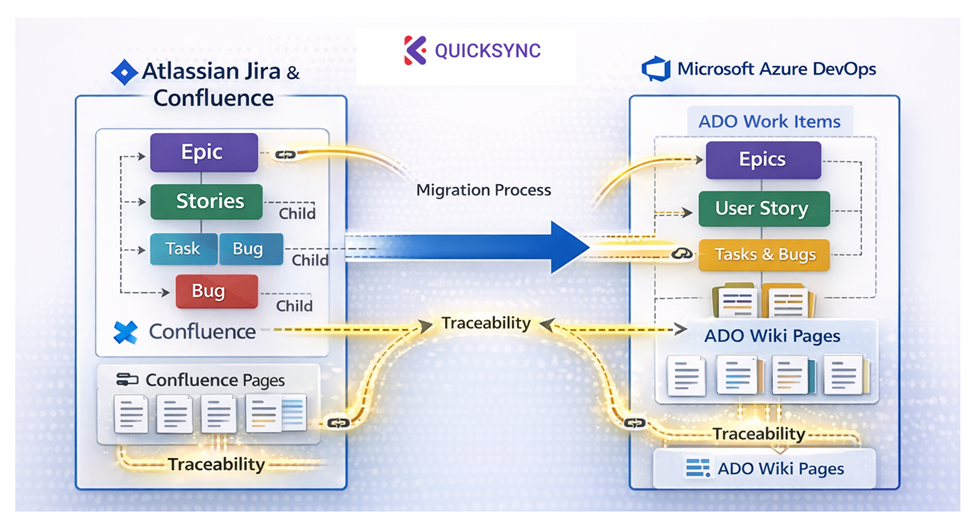
- Preserve Jira issue hierarchies (Epic → Story → Task → Bug)
- Maintain traceability between Confluence pages and Jira issues
- Recreate those links seamlessly between ADO Wiki and Work Items
- Complete the migration quickly, safely, and cost-effectively
How Kovair QuickSync Made the Difference
Kovair QuickSync facilitates flexible and precise mapping, for Example
- Jira Epics → ADO Epics
- Stories → User Stories
- Tasks & Bugs → Tasks and Bugs
Parent-child relationships, dependencies, and related links were preserved automatically, eliminating manual link establishment.
Seamless Confluence to ADO Wiki Traceability
Instead of treating documentation as static content, QuickSync helped:
- Migrate Confluence pages into structured ADO Wiki
- Maintain contextual links between Wiki pages and ADO Work Items
- Jira issues linked to Confluence pages became ADO Work Items linked to ADO Wiki pages
Kovair QuickSync – Faster Migration, Lower Cost, Less Risk
What would typically take months using scripts or custom tools was completed in weeks with higher accuracy and predictability using Kovair QuickSync.
- Accelerated timelines through automation and reusable mappings
- Lower migration cost by reducing manual effort and rework
- Built-in validation to ensure data completeness and accuracy