As the transformation to DevOps continues, DevOps teams are migrating to Azure DevOps as a comprehensive platform to facilitate planning, development, testing, and creating documentation. This is often in response to a desire for optimization and a future where there is one platform to address all engineering requirements.
Different tools like Confluence for documentation and Jira for task management have resulted in scattered information, escalated pricing, and a lack of end-to-end insights. Azure DevOps solves this problem by providing single-point tracking, better integration between code, work items, and documentation, and easier operational flow.
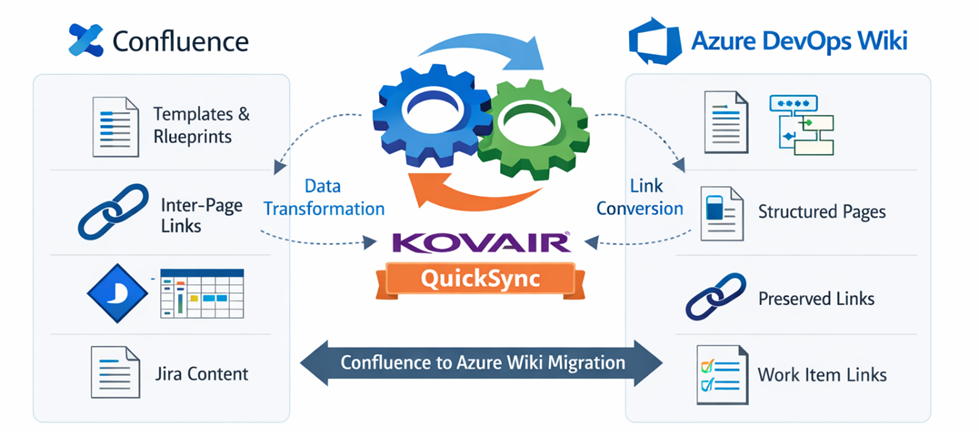
The migration of an existing knowledge base from the Confluence system by Atlassian to the Azure DevOps Wiki system is not an easy task. The reason is that the pages of the Confluence system are highly interlinked pages enriched by the use of templates, blueprints, and content generated by the Jira system.
This is where the importance of Kovair QuickSync arises, helping achieve a managed, scalable, and economical transition while retaining the integrity and usability of enterprise documentation.
Why Confluence to Azure DevOps Wiki Migration is Challenging
1. Templates and Blueprints Require Manual Redesign
Confluence templates and blueprints (e.g., meeting notes, requirement specs, retrospectives) rely on native Confluence features that do not have direct equivalents in Azure DevOps Wiki.
Inter-Page Links Break Easily
2. Confluence spaces often contain thousands of interlinked pages:
- Relative page links
- Anchors within pages
- Cross-space references
3. Jira Content Embedded Inside Confluence Pages
Many Confluence pages embed Jira content, including:
- Tables containing Jira issue links
- Linked epics, stories, and bugs
Manual Migration is Costly and Error-Prone
Typical manual migration challenges include:
- High engineering and documentation effort
- Inconsistent formatting and hierarchy
- No audit trail or reconciliation
- Difficult rollback or re-run
How Kovair QuickSync Solves These Challenges
Kovair QuickSync is an enterprise-grade data migration and synchronization platform designed for complex data ecosystems. It provides a controlled and repeatable approach for migrating Confluence pages into Azure DevOps Wiki.
- Structured Page Migration with Hierarchy Preservation
- Intelligent Handling of Inter-Page Links
- Jira Content Transformation Inside Pages
- Controlled migration of Template and Blueprint
- Supports phased and large-scale migrations
- Proven, scalable, and cost-effective
Conclusion
Moving Confluence pages to Azure DevOps is not just about moving content; it is a knowledge transition. Without proper tools, it is likely that context, traceability, and user information are lost. Kovair QuickSync has proven scalability and a cost-effective strategy that handles challenges such as templates, linking, Jira Integration, and Validation, incorporating documentation that remains a living document in Azure DevOps.