The technology landscape is rapidly changing, and the latest advancements in the software delivery process require instruments to enable and ensure perfect collaboration, traceability, and finish-to-start processes from the perspective of DevOps. Organizations, while undergoing analysis and transformation in the development tool chain, are considering and, in fact, carrying out the migration from Atlassian Jira to Azure DevOps.Its significance goes beyond a simple platform switch because it’s a part of a bigger shift toward a focus on consolidation and cost optimization.
Current Industry Trend on Data Migration
Atlassian Jira has been an issue and project tracking powerhouse across industries for a very long period of time, but recent changes are forcing both organizations to rethink how they plan their tooling strategy.
- Cloud and licensing shifts: Continued price increases, coupled with the evolution of Atlassian’s licensing structure, have made many enterprises reassess the total cost of ownership of Jira, especially when used in conjunction with other tools such as Confluence and Bitbucket.
- Adoption of the Microsoft ecosystem: Azure, Microsoft 365 offers natively integrate application into the same ecosystem to support common identity, reporting, & governance.
- Toolchain consolidation: DevOps strategies call for reducing tool sprawl and linking work-item tracking directly with repos, pipelines, artifacts, and test management.
Data Migration Challenges & Common Pitfalls
Migrating from Jira to Azure DevOps is far more complex than simply exporting and importing issues. The following challenges
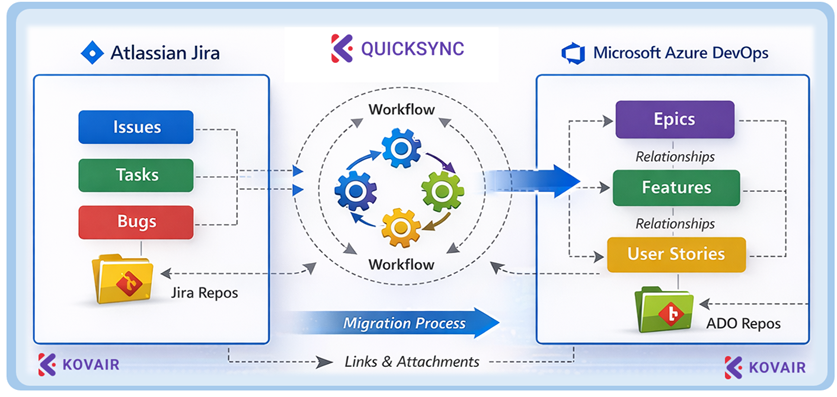
- Data & Workflow Mapping Complexities: Jira’s customizable workflows, fields, and issue types don’t always map cleanly to Azure DevOps work items. Without careful mapping, important data relationships can be lost
- Preserving Historical Context: Maintaining complete history, comments, attachments, and link relationships (e.g., parent/child, blockers) is crucial for traceability and audits
- Workflow & Process Differences: Jira and Azure DevOps enforce development and agile paradigms. Without adjusting workflows and educating teams, productivity dips are common — teams may feel constrained by the new Application
Benefits of Data Migrating to Azure DevOps
Successful migrations deliver long-term strategic advantages
- Cost Optimization: Consolidating tools and utilizing Azure DevOps as part of an existing Microsoft licensing investment can reduce overall toolchain costs compared to multi-vendor setups
- Unified DevOps Platform: Azure DevOps combines boards, repos, pipelines, test plans, and artifacts in one platform, reducing fragmentation between teams and tools.
- Improved Traceability & Reporting: Integration across work items, commits, builds, and releases – traceability and insights into delivery performance
Migrating Data Smoothly with Kovair QuickSync & Experienced Practitioners
Enterprise-grade migrations require more than scripts or manual export/import. That’s where Kovair QuickSync, combined with seasoned migration consultants, delivers true value:
- Structured Discovery & Planning
- Initial assessment of Jira configurations, custom fields, workflows, and data quality
- Migration roadmap with phased cut-over and pilot runs
- Automated Field & Workflow Mapping
- Kovair QuickSync helps align Jira issue types and fields to Azure DevOps work items, preserving relationships and minimizing manual transformation work.
- Historical Preservation & Relationship Integrity
- Using automation, history, comments, attachments, and links are migrated, ensuring teams can continue work without missing critical context
- Dry Runs & Validation
- Before full execution, migration experts run pilot migrations, validate outcomes, and adjust mappings – reducing risk and ensuring business continuity.
Conclusion
Atlassian Jira to Microsoft Azure DevOps migration is a strategic move that assists in improving development operations. Although there are some difficulties during this process, like workflow mapping, data integrity, and adoption, these problems can easily be eliminated with proper guidance in terms of automation tools such as Kovair QuickSync. This makes it a smooth, secure, and successful process at an enterprise level.